
A payment link gives customers a direct route from an unpaid invoice to online checkout. They choose an available payment method and complete the transaction through a payment service, while you can track its status without relying on paper records.
The transaction is only part of the process. Clear payment terms, sensible fraud safeguards, timely reminders and reliable records all matter, particularly when manual follow-ups push admin into a sole trader’s evening.
This guide explains how to collect customer payments online, reduce fraud risks and automate routine payment follow-ups, so you can manage records more easily and get on with your work.
Key Takeaways
- Match payment options to your customers and the size of each transaction to make paying straightforward.
- Learn how authentication and secure payment handling can help reduce fraud risks.
- See how scheduled reminders and clear due dates can cut down on manual follow-ups.
- Find out how WaPay links invoices with online payments to make collection simpler.
Table of Contents
Payments fundamentals: How do online payments work?
An online payment passes from the customer’s chosen method through processing before the funds reach your business account. The right setup depends on who is paying, the transaction and the customer’s location.
Matching methods to customers and transaction sizes
Choose payment methods to suit your customers and the transaction. Cards can work well for one-off invoices, while bank payments may suit larger business payments. A payment link takes a customer directly from an invoice to checkout, for example, after a service business finishes a job. Recurring payments can suit regular services when the customer has agreed to the schedule.
International methods, local options and currencies
International payment methods give overseas customers a familiar way to pay, while local options can make checkout easier to follow. An Irish customer might choose a card or digital wallet; a customer abroad may prefer a local bank method. Showing the total in the customer’s home currency helps make the amount clear before payment. For example, an Irish business invoicing an overseas client can state the currency and payment method on the invoice.
Provider comparisons, costs and fund settlement
Irish businesses can use payment services to accept card, wallet and bank payments. Compare providers’ supported methods, recurring payment options, reporting tools and settlement timing with your customers’ needs and usual transactions. With card payments, customers enter their details and complete any required authentication. Digital wallets offer another checkout option, while recurring payments collect agreed amounts on a schedule.
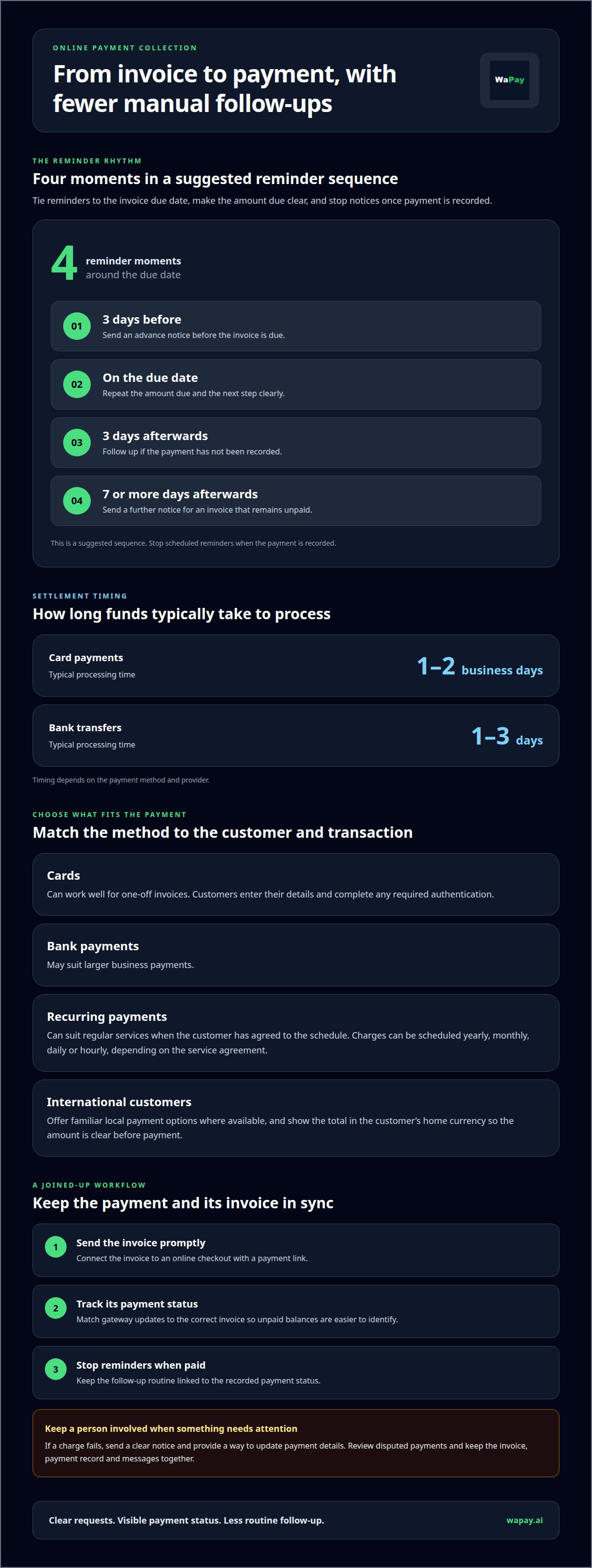
Card payments typically process within 1-2 business days; bank transfers typically take 1-3 days. Timing depends on the payment method and provider. A payment link connects an invoice to an online checkout.
Payment security and fraud prevention
Secure payment pages protect customer details during online commerce and help you spot suspicious transactions. Use a checkout page with an encrypted connection, and keep credit card details out of email, messages and handwritten notes. A merchant should also review transaction records regularly, looking for unfamiliar payments, repeated attempts or mismatches between an invoice and payment.
In Ireland, online payments sit within the EU PSD2 framework, which requires payment intermediaries to be licensed. Strong Customer Authentication rules require enhanced authentication for online payments, according to the European Union. The European Union also says GDPR applies when Irish businesses process customer data, covering lawful processing, customer rights, data minimisation, security and privacy by design.
Give customers a secure page for card and wallet payments rather than asking them to read card details over the phone. If taking payment during a call, send a payment link and let the customer enter their details privately. A stable internet connection helps prevent interrupted checkouts; if a page stalls, check the transaction status before trying again to avoid a duplicate charge.
If a payment fails, tell the customer and send a fresh secure link. For a refund or dispute, keep the invoice, payment record and messages together, then process the refund through the payment service and record its status. If a customer raises a chargeback, submit the relevant invoice and evidence of the agreed work through the provider’s dispute process. Never send full card details as evidence.
A clear payment trail makes security easier to manage. Set up a simpler payment workflow when you’re ready to reduce manual handling.
Automating online payment collection
Automation links each payment request to its due date and status, reducing manual follow-up. A payment service processes the transaction, while an integration can pass updates to invoicing or bookkeeping records. For a sole trader finishing a job, this means sending the invoice promptly and keeping its payment status visible.
Set a reminder schedule around the invoice due date, then stop reminders when payment is recorded. One suggested sequence sends notices three days before the due date, on the due date, three days afterwards, and seven or more days afterwards. Clear wording helps each client see the amount due and the next step, without repeated one-off messages from you.
For recurring work, automation can schedule charges yearly, monthly, daily or hourly, depending on the service agreement. A consumer paying for a regular service, for example, can follow an agreed schedule rather than receiving a fresh manual request each time. Card expiry notifications can also prompt a client to update payment details before a scheduled charge is attempted.
Keep the workflow joined up. When a customer pays through the gateway, the payment status should connect with the matching invoice, so you can identify unpaid balances and follow up accurately. If a charge fails, route a clear notice to the customer and give them a way to update payment details. Review the records regularly to catch missed messages or incorrect invoice matches.
Automate repeatable tasks, but keep a person involved when a payment fails or a customer disputes an amount. This reduces routine admin without leaving unusual cases unattended.
WaPay
WaPay brings invoicing and online payments together for small businesses in Ireland. Create a VAT-compliant invoice from a voice note or web form, then share its payment link. You can also manage quotes, bills and bookings through WhatsApp or the web dashboard, keeping routine admin close to the work.
Customer payments go directly to your business bank account. If payment requests and records currently sit in separate processes, bringing them together can make everyday admin easier to manage.
Keep your business records accessible
WaPay lets you export your business data, so you can keep a copy of your records outside the service. Its VAT records and transaction trail can also help you keep business activity organised. If you’d like to discuss how WaPay fits your payment workflow, contact the WaPay team.
Make your next payment cycle easier
Start with one practical improvement: identify where a payment request currently waits, then give it a clear owner and consistent follow-up. That turns online payment collection into a workable routine instead of another task carried into the evening.
WaPay’s team can help you consider how payment collection fits your day-to-day admin, so you can decide whether a more connected process suits your business. Start with the part that causes the most friction, then build from there at a pace that works for you. Keep the aim clear: know what needs action, what’s complete and what deserves your personal attention. A simpler routine leaves more room for customers and the work that keeps your business moving.
Register with WaPay online to bring payment requests and business admin into one workflow.
Frequently Asked Questions
What is Payment Collection?
Payment collection is the process of requesting, receiving and recording money owed to your business. After completing a repair, for example, you issue an invoice, give the customer a way to pay and update your records when the payment arrives. A clear process helps you match payments to invoices and spot outstanding balances.
How can a business set up an online payment gateway or payment link?
Choose a payment service, create a payment request and share it with your customer. With WaPay, create an invoice from a voice note or text, then send its payment link through WhatsApp, SMS or email. Customers can pay by bank transfer, card, Apple Pay or Google Pay, using the channel that suits them.
What security and fraud risks arise when collecting customer payments online, and how can they be reduced?
Online payment risks include stolen card details, fake payment messages and disputes over whether work was completed. Use secure payment pages, avoid sending card details in messages, and keep invoices and customer correspondence together. WaPay processes card and wallet payments through Stripe; payment details aren’t shared with WaPay or your business. Its transaction records help you trace payment activity when reviewing a query.
What are the transaction fees and monthly costs for online payment services in Ireland?
What tax, VAT, invoicing, and record-keeping requirements apply to online customer payments in Ireland?
Match each payment to its invoice and keep the invoice, payment record and related messages together. WaPay provides exportable business data, VAT records and a transaction trail. When processing customer data, Irish businesses must address lawful processing, customer rights, data minimisation, security and privacy by design.
Frequently asked questions
What is Payment Collection?
Payment collection is the process of requesting, receiving and recording money owed to your business. After completing a repair, for example, you issue an invoice, give the customer a way to pay and update your records when the payment arrives. A clear process helps you match payments to invoices and spot outstanding balances.
How can a business set up an online payment gateway or payment link?
Choose a payment service, create a payment request and share it with your customer. With WaPay, create an invoice from a voice note or text, then send its payment link through WhatsApp, SMS or email. Customers can pay by bank transfer, card, Apple Pay or Google Pay, using the channel that suits them.
What security and fraud risks arise when collecting customer payments online, and how can they be reduced?
Online payment risks include stolen card details, fake payment messages and disputes over whether work was completed. Use secure payment pages, avoid sending card details in messages, and keep invoices and customer correspondence together. WaPay processes card and wallet payments through Stripe; payment details aren’t shared with WaPay or your business. Its transaction records help you trace payment activity when reviewing a query.
What tax, VAT, invoicing, and record-keeping requirements apply to online customer payments in Ireland?
Match each payment to its invoice and keep the invoice, payment record and related messages together. WaPay provides exportable business data, VAT records and a transaction trail. When processing customer data, Irish businesses must address lawful processing, customer rights, data minimisation, security and privacy by design.