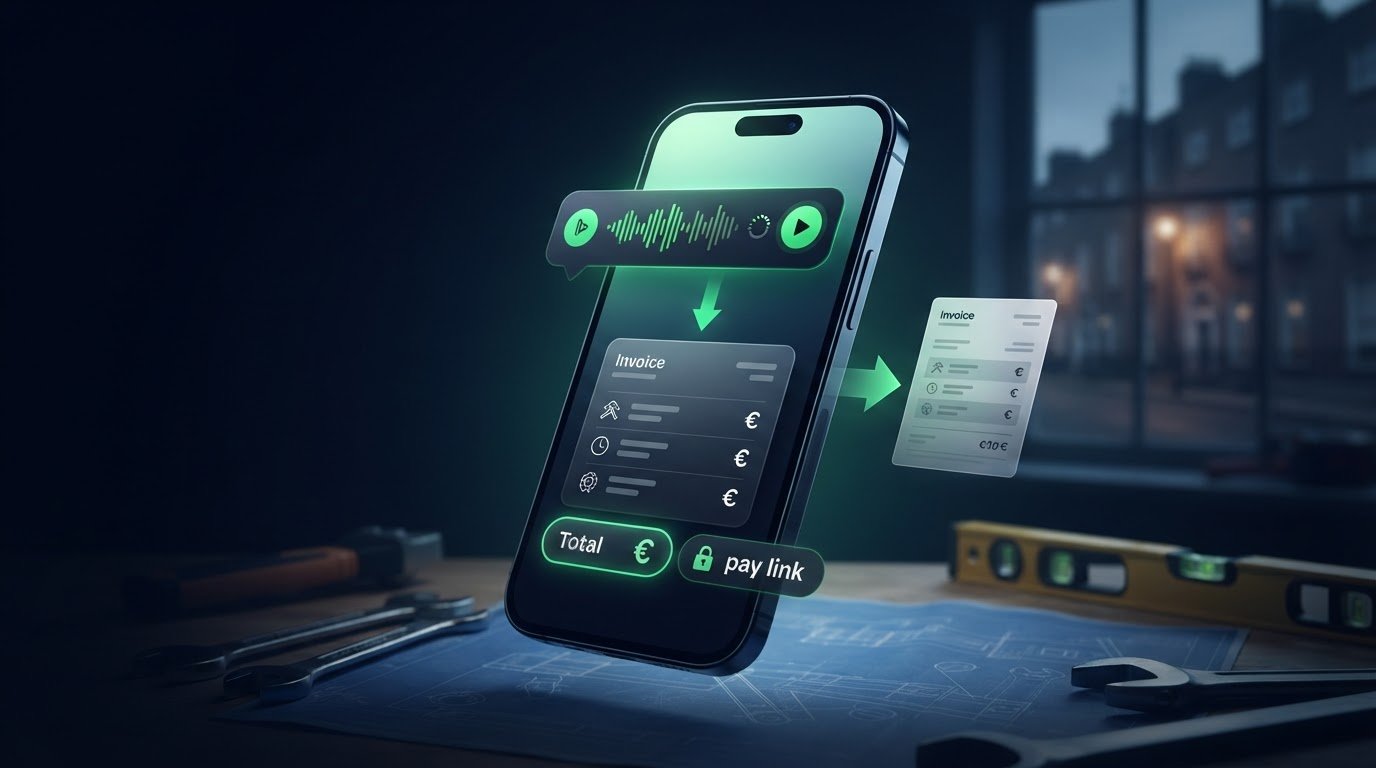
You finish a job, pack your tools and head to the next one. By evening, the customer’s name, extra parts or agreed amount may be harder to remember. If you’re searching for “create invoice from voice note”, the key is to capture the work while it’s fresh, then check the draft before sending it.
Typing an invoice on your phone can feel like another job in itself. A voice note can make the first step simpler, but speech recognition may miss a name, task or figure. A quick review helps keep the invoice clear and accurate.
This guide walks through a practical voice-to-invoice workflow for Irish small businesses, from recording job details to checking the customer information, work description and amount. You’ll also see how WaPay lets you create invoices from voice notes or text through WhatsApp or its WebApp, then share the invoice with a payment link. Capture the details, review them and send the invoice, with less admin left for later.
Key Takeaways
- To create an invoice from voice note details, turn your spoken job summary into clear invoice lines rather than copying it as a transcript.
- Use a quick review checklist for the customer’s details, work description, quantities, totals and due date before sending.
- Dictate the customer, work, quantities and charges in a consistent order. State each separate charge clearly so the draft is easier to check.
- Learn how WaPay’s WhatsApp or WebApp workflow connects invoice creation with sharing the invoice and its payment link.
- Capture job details in a repeatable routine, so less invoicing is left until the end of the day.
Table of Contents
Why create an invoice from a voice note straight after the job?
The next job can start before you’ve had a chance to write anything down. By the time you sit down later, the extra task, materials used or customer’s exact instructions may be less clear. Capturing those details straight after the work gives you a useful starting point while they’re fresh and avoids having to rebuild the job from memory at the end of the day.
Voice-to-invoice means dictating job information so it can be turned into an invoice draft. The note captures the details, but it doesn’t approve the invoice or make it ready to send. You still need to review the draft. For an overview of what an invoice is and what it’s for, see Wikipedia.
Which business details should a voice note capture?
Keep the note focused on details that help identify the customer and describe the completed work. Use a full name or another clear identifier if you have customers with similar names. Then describe what you did in plain, specific terms rather than using shorthand that may not make sense later.
- Customer: Say the name clearly and include a useful identifier, such as the business name, where relevant.
- Work: Describe the completed task and any important parts of the job.
- Charges: State quantities and agreed charges. Name materials and labour separately if they’re separate charges.
For example, “repaired the leaking kitchen tap” is clearer than “tap job”. A precise description helps you check that the invoice reflects work the customer recognises.
Why is capturing the job promptly useful?
A structured note gives you something concrete to work from instead of relying on memory after several more jobs. It can help preserve small but important details, such as a replacement part or an additional task agreed during the visit. Clear notes also make it easier to create readable invoice lines rather than a transcript full of fragments.
Imagine finishing a repair and heading to another customer. Before moving on, record the customer’s name, the repair completed, the quantity of materials used and the agreed charges. Later, those details provide a clearer basis for the invoice than a hurried note made at home after a full working day.
That’s the practical value of a create-invoice-from-voice-note workflow: capture the job while it’s fresh, then turn the note into a draft you can check. A prompt draft isn’t automatically approved. Review the customer, description and charges before sending, and correct anything that doesn’t match the work completed.
How does a voice note become a usable invoice?
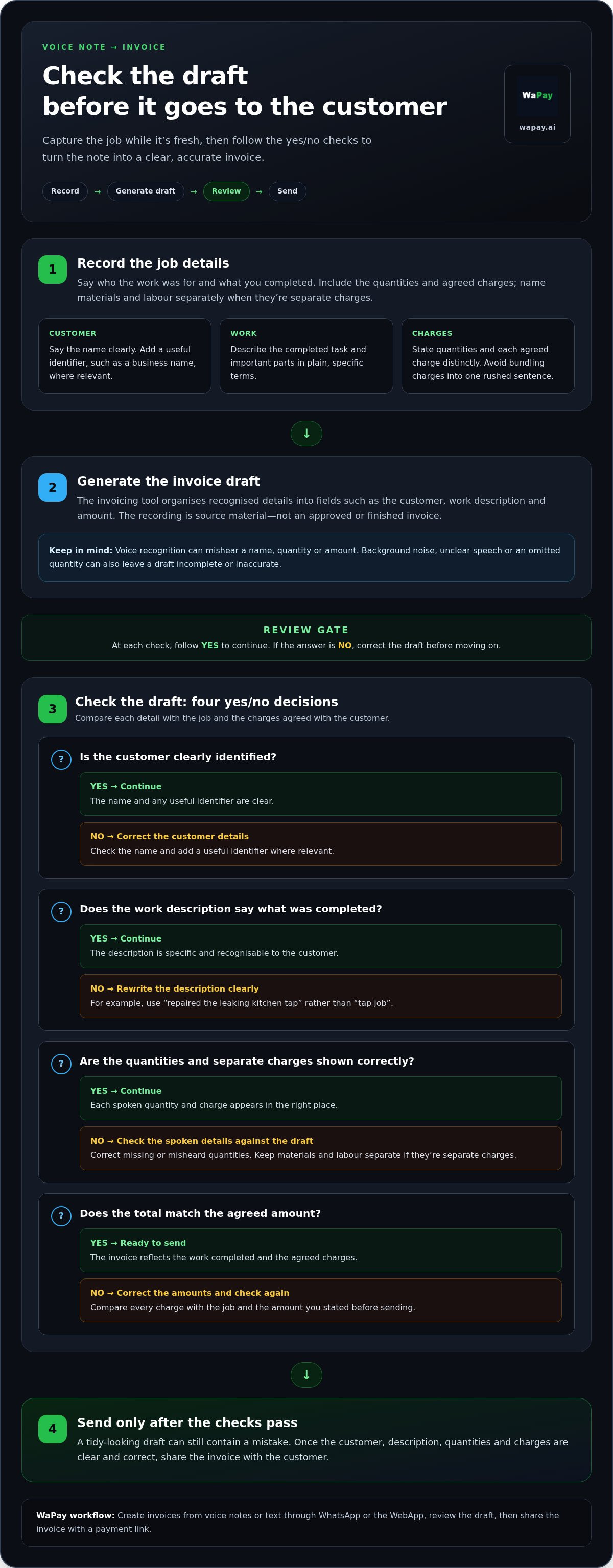
A voice note is the starting material, not the finished invoice. To create an invoice from voice note details, follow a simple sequence: record the job, generate a draft, check its contents, then send it to the customer. Each step has a purpose. The recording captures what happened, the draft organises it, and your review catches mistakes before the customer sees it.
- Record: Say who the work was for and what you completed.
- Generate: Let the invoicing tool arrange the recognised details into a draft.
- Review: Check names, descriptions, quantities and charges against the job.
- Send: Share the invoice once the details are clear and correct.
A generated invoice remains a draft until you’ve checked that it matches the work and agreed charges. That human check matters because voice recognition can misinterpret speech. The US Food and Drug Administration’s overview of voice recognition systems provides background on the technology. For invoicing, the practical takeaway is to verify the result rather than assume every spoken detail was captured correctly.
What should you say in the recording?
Speak in short, distinct phrases. Start with the customer’s name, then give a plain description of the completed job. State each quantity, rate and separate charge on its own, followed by the agreed total. This makes it easier to compare what you said with the draft’s invoice lines.
For example: “Customer, [name]. Replaced two outdoor light fittings. Labour, [agreed charge]. Materials, [agreed charge]. Total, [agreed amount].” Use the figures agreed for the job, and avoid bundling several charges into one rushed sentence. If a name or technical term could be misheard, spell it out or repeat it clearly.
What happens between the recording and sending?
The tool interprets the recording and places recognised information into invoice fields, such as the customer, work description and amount. Some details may come from the note; others may already be held by the invoicing tool, depending on what you’ve entered or saved. Don’t assume a missing detail will be filled in correctly.
Background noise, unclear speech or an omitted quantity can leave a draft incomplete or inaccurate. Check that every spoken charge appears in the right place, the description reads like an invoice line rather than a raw transcript, and the total matches the amount you stated. Correct anything unclear before sending the invoice to the customer.
WaPay lets Irish small businesses create invoices from voice notes or text through WhatsApp or its WebApp. Use that workflow to turn spoken job details into a draft, review it and share it with the customer. If you want a voice-based invoicing workflow, WaPay invoice creation connects the spoken note with the next practical step: preparing an invoice for review.
How can you check a voice-created invoice for accuracy?
Voice recognition can mishear a customer’s name, change a quantity or capture the wrong amount. A draft may look tidy and still contain an error. Before sending, compare it with your job notes and what you agreed with the customer. A human review helps catch misheard names, missing quantities, duplicated charges, incorrect totals and date errors before the invoice reaches the customer.
Which errors are easiest to miss?
Check the invoice from top to bottom, not just the final figure. A correct total won’t fix a misspelt customer name or a vague description that makes the work hard to recognise. Read each line against what you dictated and the job you completed.
- Customer: Check that the name and contact details belong to the right person or business.
- Work description: Make sure it describes the completed job clearly, without garbled or ambiguous wording.
- Quantities and charges: Compare each quantity and line amount with the agreed price. Look for missing items, duplicated charges or a figure assigned to the wrong line.
- Total and dates: Recheck the arithmetic, invoice date and due date. Confirm the due date matches the terms agreed with the customer.
Pay close attention to figures spoken quickly or over background noise. If you dictated separate materials and labour charges, make sure both appear once and in the right amounts. If a note is unclear, correct the draft using the details you have rather than guessing.
How should you handle VAT and invoice records?
Check the VAT treatment and invoice information against current guidance from Ireland’s Revenue. Requirements can depend on your circumstances, so don’t assume a voice tool can decide the correct VAT treatment for every business. Review the figures and details that apply to your invoice before sending it.
Keep the invoice and related VAT records organised with your other business paperwork. A consistent record of what you charged and the VAT information recorded can make routine administration easier to follow. It isn’t a substitute for tax advice, and a draft shouldn’t be treated as confirmation that your VAT treatment is correct.
Make the review a repeatable habit. When you create an invoice from voice note details, pause before sending and check the customer, work, quantities, charges, total and due date. Correct any errors in the draft first. That final check helps keep the invoice clear for you and your customer without relying on a transcript to capture every detail perfectly.
How do you dictate a clear invoice note on a busy working day?
A repeatable format makes a voice note easier to record and turn into invoice lines. Keep it short, speak one item at a time and follow the same order after each job. This makes it less likely you’ll leave out a useful detail while packing up or moving on to the next customer.
A simple voice-note structure for sole traders
Start with the customer’s name and, if useful, a date or job reference to distinguish this visit from another. Describe only the work completed, using plain phrases that can stand on their own on an invoice. Then list each charge separately, including its quantity where relevant. Finish by repeating the agreed total and adding any brief follow-up detail.
- Customer: Say the customer’s name and a clear identifier if needed.
- Job reference: Add the date or reference if it helps you match the note to the job.
- Work: Describe the completed tasks in short, specific phrases.
- Quantities and charges: State each quantity, then its separate charge. Keep labour and materials distinct if they’re billed separately.
- VAT and follow-up: Include relevant VAT notes for your later review, plus any agreed follow-up detail.
- Total: Repeat the agreed total clearly.
For instance, record: “Customer, [name]. Job reference, [date or code]. Work completed, [specific task]. Materials, [quantity and agreed charge]. Labour, [agreed charge]. Total, [agreed amount]. Follow-up, [short note].” Use the figures agreed for that job. Don’t rely on the tool to work out what you meant if a charge or quantity isn’t clear.
How can you make dictation easier to review?
Keep the same order every time. Pause between line items rather than running materials, labour and other charges together. In a noisy worksite, step somewhere quieter if practical, or repeat important names and figures after a brief pause. A deliberate gap can help you hear whether the amount came through clearly.
Keep the recording focused on the job. Don’t dictate sensitive payment-card details or other information that isn’t needed to describe the work or prepare the invoice. If a name or technical term is unusual, spell it aloud or say it twice. Short, separate statements are easier to review than a long account filled with shorthand.
Use the sequence as a prompt, not as a substitute for checking the finished draft. To put this routine into practice, create invoices from voice notes with WaPay.
How does WaPay help create an invoice from a voice note?
WaPay gives Irish small businesses a way to turn spoken job details into an invoice draft through WhatsApp or its WebApp. You can also enter the details as text. The workflow keeps the first step close to a routine message, while leaving room for the important check: make sure the invoice reflects the work and agreed charges before sending it.
What does the WaPay invoice workflow look like?
Send the job information as a voice note or text. Include the customer, completed work and charges in a clear order. WaPay uses those details to create an invoice. Review the draft before sharing it, checking names, descriptions, amounts and any relevant VAT information against your records. The voice note starts the process; your review keeps the invoice under your control.
Once you’re happy with the invoice, share it with the customer along with its payment link. Customers can pay by bank transfer, card, Apple Pay or Google Pay. Payments go directly to your business bank account. Payment methods don’t guarantee that every payment will arrive instantly, so keep expected payment timing clear in your own routine.
This brings together two practical tasks: preparing the invoice and giving the customer a clear way to pay. Instead of writing down the job details and re-entering them elsewhere, you can send them through a channel you may already use. You still check the invoice before it goes out, but the details have a direct route from completed work to customer billing.
How can WaPay reduce routine admin friction?
Invoice creation is part of the wider payment follow-up. WaPay also supports payment reminders, VAT records and a live business dashboard, bringing related admin tasks together. A reminder can bring an unpaid invoice back to your attention, while the dashboard gives you a place to view business activity. These tools support routine organisation; they don’t replace your review of invoice details or VAT treatment.
There’s no subscription and no app to download. Work through WhatsApp or the WebApp, then share the reviewed invoice and payment link with your customer. The process stays focused on the essentials: record the job, prepare the invoice, check it, send it and follow up on payment where needed.
To bring those steps into one workflow, Explore WaPay and see how voice or text invoice creation can fit into your day.
Make the next completed job your starting point
Choose one simple habit for your next job: record the customer, the work and each agreed charge before you move on. A consistent note gives you a useful starting point later, without relying on memory to fill the gaps. The aim isn’t to remove your judgement from invoicing. It’s to make the admin easier to pick up, check and finish.
If you want to create an invoice from voice note details as part of that routine, WaPay lets you send voice notes or text through WhatsApp or its WebApp, then review and share the invoice with your customer. There’s no subscription or app download, and customer payments go directly to your business bank account. You stay in control of the details while giving the customer a clear next step.
Explore WaPay and simplify your invoicing, then put your next job note to work. A little structure now can help you finish the working day with less paperwork waiting.
Frequently Asked Questions
Can I create an invoice from a voice note in Ireland?
Yes. You can use a voice note to provide the information needed to create an invoice, but the recording method doesn’t establish whether the finished invoice meets the requirements that apply to you. Before sending, check that the customer and business details, work description and amounts are correct. If VAT applies, review the relevant information against current Revenue guidance for your business and transaction.
Is a voice-created invoice valid for an Irish business?
The fact that an invoice began as a voice note doesn’t determine whether it meets the requirements that apply to your business. Focus on the completed document and the transaction it records. Check that the customer, work and charges are represented accurately, and that applicable VAT information is present. Use current Revenue guidance or professional tax advice for questions about your circumstances.
What should I do if a voice note gets an amount wrong?
Correct the invoice draft before sending it. Compare the figure with the agreed price, job notes or another record, then check that each charge belongs to the right line. If the invoice has already gone to the customer, keep a clear record of what was wrong and how you corrected it. Follow the invoicing process that applies to your business rather than silently replacing the original record.
Can I include VAT in an invoice created from a voice note?
Yes, you can provide relevant VAT information in the invoice details, but don’t rely on a voice tool to decide the correct treatment. Check the applicable rate, calculation and invoice particulars against current Revenue guidance for your business and transaction. Take extra care if different lines have different VAT treatments. Review those details on the completed invoice before sharing it with the customer.
Should I dictate customer payment-card details into a voice note?
No. Leave card numbers, security codes and other sensitive payment credentials out of invoice recordings. A job note only needs information relevant to identifying the customer, describing the work and preparing the charge. Use an appropriate payment flow for payment instructions, and avoid recording personal details that aren’t needed to manage the invoice. This keeps sensitive information out of a note that may be stored or revisited later.
Do I need a separate app to create an invoice with WaPay?
No. WaPay works through WhatsApp or its WebApp, so there’s no app to download. Send the invoice details as a voice note or text, then review the resulting invoice before sharing it. The customer can use the available payment options in the payment workflow. This lets you prepare an invoice through channels you can access without adding a separate invoicing app to your phone.
Frequently asked questions
Which business details should a voice note capture?
Keep the note focused on details that help identify the customer and describe the completed work. Use a full name or another clear identifier if you have customers with similar names. Then describe what you did in plain, specific terms rather than using shorthand that may not make sense later. For example, “repaired the leaking kitchen tap” is clearer than “tap job”. A precise description helps you check that the invoice reflects work the customer recognises.
Why is capturing the job promptly useful?
A structured note gives you something concrete to work from instead of relying on memory after several more jobs. It can help preserve small but important details, such as a replacement part or an additional task agreed during the visit. Clear notes also make it easier to create readable invoice lines rather than a transcript full of fragments. Imagine finishing a repair and heading to another customer. Before moving on, record the customer’s name, the repair completed, the quantity of materials used and the agreed charges. Later, those details provide a clearer basis for the invoice than a hurried note made at home after a full working day. That’s the practical value of a create-invoice-from-voice-note workflow: capture the job while it’s fresh, then turn the note into a draft you can check. A prompt draft isn’t automatically approved. Review the customer, description and charges before sending, and correct anything that doesn’t match the work completed. A voice note is the starting material, not the finished invoice. To create an invoice from voice note details, follow a simple sequence: record the job, generate a draft, check its contents, then send it to the customer. Each step has a purpose. The recording captures what happened, the draft organises it, and your review catches mistakes before the customer sees it. A generated invoice remains a draft until you’ve checked that it matches the work and agreed charges. That human check matters because voice recognition can misinterpret speech. The US Food and Drug Administration’s overview of voice recognition systems provides background on the technology. For invoicing, the practical takeaway is to verify the result rather than assume every spoken detail was captured correctly.
What should you say in the recording?
Speak in short, distinct phrases. Start with the customer’s name, then give a plain description of the completed job. State each quantity, rate and separate charge on its own, followed by the agreed total. This makes it easier to compare what you said with the draft’s invoice lines. For example: “Customer, [name]. Replaced two outdoor light fittings. Labour, [agreed charge]. Materials, [agreed charge]. Total, [agreed amount].” Use the figures agreed for the job, and avoid bundling several charges into one rushed sentence. If a name or technical term could be misheard, spell it out or repeat it clearly.
What happens between the recording and sending?
The tool interprets the recording and places recognised information into invoice fields, such as the customer, work description and amount. Some details may come from the note; others may already be held by the invoicing tool, depending on what you’ve entered or saved. Don’t assume a missing detail will be filled in correctly. Background noise, unclear speech or an omitted quantity can leave a draft incomplete or inaccurate. Check that every spoken charge appears in the right place, the description reads like an invoice line rather than a raw transcript, and the total matches the amount you stated. Correct anything unclear before sending the invoice to the customer. WaPay lets Irish small businesses create invoices from voice notes or text through WhatsApp or its WebApp. Use that workflow to turn spoken job details into a draft, review it and share it with the customer. If you want a voice-based invoicing workflow, WaPay invoice creation connects the spoken note with the next practical step: preparing an invoice for review. Voice recognition can mishear a customer’s name, change a quantity or capture the wrong amount. A draft may look tidy and still contain an error. Before sending, compare it with your job notes and what you agreed with the customer. A human review helps catch misheard names, missing quantities, duplicated charges, incorrect totals and date errors before the invoice reaches the customer.
Which errors are easiest to miss?
Check the invoice from top to bottom, not just the final figure. A correct total won’t fix a misspelt customer name or a vague description that makes the work hard to recognise. Read each line against what you dictated and the job you completed. Pay close attention to figures spoken quickly or over background noise. If you dictated separate materials and labour charges, make sure both appear once and in the right amounts. If a note is unclear, correct the draft using the details you have rather than guessing.
How should you handle VAT and invoice records?
Check the VAT treatment and invoice information against current guidance from Ireland’s Revenue. Requirements can depend on your circumstances, so don’t assume a voice tool can decide the correct VAT treatment for every business. Review the figures and details that apply to your invoice before sending it. Keep the invoice and related VAT records organised with your other business paperwork. A consistent record of what you charged and the VAT information recorded can make routine administration easier to follow. It isn’t a substitute for tax advice, and a draft shouldn’t be treated as confirmation that your VAT treatment is correct. Make the review a repeatable habit. When you create an invoice from voice note details, pause before sending and check the customer, work, quantities, charges, total and due date. Correct any errors in the draft first. That final check helps keep the invoice clear for you and your customer without relying on a transcript to capture every detail perfectly. A repeatable format makes a voice note easier to record and turn into invoice lines. Keep it short, speak one item at a time and follow the same order after each job. This makes it less likely you’ll leave out a useful detail while packing up or moving on to the next customer.
How can you make dictation easier to review?
Keep the same order every time. Pause between line items rather than running materials, labour and other charges together. In a noisy worksite, step somewhere quieter if practical, or repeat important names and figures after a brief pause. A deliberate gap can help you hear whether the amount came through clearly. Keep the recording focused on the job. Don’t dictate sensitive payment-card details or other information that isn’t needed to describe the work or prepare the invoice. If a name or technical term is unusual, spell it aloud or say it twice. Short, separate statements are easier to review than a long account filled with shorthand. Use the sequence as a prompt, not as a substitute for checking the finished draft. To put this routine into practice, create invoices from voice notes with WaPay. WaPay gives Irish small businesses a way to turn spoken job details into an invoice draft through WhatsApp or its WebApp. You can also enter the details as text. The workflow keeps the first step close to a routine message, while leaving room for the important check: make sure the invoice reflects the work and agreed charges before sending it.
What does the WaPay invoice workflow look like?
Send the job information as a voice note or text. Include the customer, completed work and charges in a clear order. WaPay uses those details to create an invoice. Review the draft before sharing it, checking names, descriptions, amounts and any relevant VAT information against your records. The voice note starts the process; your review keeps the invoice under your control. Once you’re happy with the invoice, share it with the customer along with its payment link. Customers can pay by bank transfer, card, Apple Pay or Google Pay. Payments go directly to your business bank account. Payment methods don’t guarantee that every payment will arrive instantly, so keep expected payment timing clear in your own routine. This brings together two practical tasks: preparing the invoice and giving the customer a clear way to pay. Instead of writing down the job details and re-entering them elsewhere, you can send them through a channel you may already use. You still check the invoice before it goes out, but the details have a direct route from completed work to customer billing.
How can WaPay reduce routine admin friction?
Invoice creation is part of the wider payment follow-up. WaPay also supports payment reminders, VAT records and a live business dashboard, bringing related admin tasks together. A reminder can bring an unpaid invoice back to your attention, while the dashboard gives you a place to view business activity. These tools support routine organisation; they don’t replace your review of invoice details or VAT treatment. There’s no subscription and no app to download. Work through WhatsApp or the WebApp, then share the reviewed invoice and payment link with your customer. The process stays focused on the essentials: record the job, prepare the invoice, check it, send it and follow up on payment where needed. To bring those steps into one workflow, Explore WaPay and see how voice or text invoice creation can fit into your day. Choose one simple habit for your next job: record the customer, the work and each agreed charge before you move on. A consistent note gives you a useful starting point later, without relying on memory to fill the gaps. The aim isn’t to remove your judgement from invoicing. It’s to make the admin easier to pick up, check and finish. If you want to create an invoice from voice note details as part of that routine, WaPay lets you send voice notes or text through WhatsApp or its WebApp, then review and share the invoice with your customer. There’s no subscription or app download, and customer payments go directly to your business bank account. You stay in control of the details while giving the customer a clear next step. Explore WaPay and simplify your invoicing, then put your next job note to work. A little structure now can help you finish the working day with less paperwork waiting.
Can I create an invoice from a voice note in Ireland?
Yes. You can use a voice note to provide the information needed to create an invoice, but the recording method doesn’t establish whether the finished invoice meets the requirements that apply to you. Before sending, check that the customer and business details, work description and amounts are correct. If VAT applies, review the relevant information against current Revenue guidance for your business and transaction.
Is a voice-created invoice valid for an Irish business?
The fact that an invoice began as a voice note doesn’t determine whether it meets the requirements that apply to your business. Focus on the completed document and the transaction it records. Check that the customer, work and charges are represented accurately, and that applicable VAT information is present. Use current Revenue guidance or professional tax advice for questions about your circumstances.
What should I do if a voice note gets an amount wrong?
Correct the invoice draft before sending it. Compare the figure with the agreed price, job notes or another record, then check that each charge belongs to the right line. If the invoice has already gone to the customer, keep a clear record of what was wrong and how you corrected it. Follow the invoicing process that applies to your business rather than silently replacing the original record.
Can I include VAT in an invoice created from a voice note?
Yes, you can provide relevant VAT information in the invoice details, but don’t rely on a voice tool to decide the correct treatment. Check the applicable rate, calculation and invoice particulars against current Revenue guidance for your business and transaction. Take extra care if different lines have different VAT treatments. Review those details on the completed invoice before sharing it with the customer.
Should I dictate customer payment-card details into a voice note?
No. Leave card numbers, security codes and other sensitive payment credentials out of invoice recordings. A job note only needs information relevant to identifying the customer, describing the work and preparing the charge. Use an appropriate payment flow for payment instructions, and avoid recording personal details that aren’t needed to manage the invoice. This keeps sensitive information out of a note that may be stored or revisited later.
Do I need a separate app to create an invoice with WaPay?
No. WaPay works through WhatsApp or its WebApp, so there’s no app to download. Send the invoice details as a voice note or text, then review the resulting invoice before sharing it. The customer can use the available payment options in the payment workflow. This lets you prepare an invoice through channels you can access without adding a separate invoicing app to your phone.