A booking confirmation should do more than say a slot is yours. Good booking confirmations for customers state what’s booked, when and where it’s happening, and what to know before arrival. Clear details prevent avoidable mix-ups and give both parties a useful record.
It’s easy to treat a confirmation as a quick admin task, but a vague message can leave customers unsure about the venue, arrival instructions or how to change their booking. A straightforward format makes the next step clear without adding paperwork to your day.
Learn what to include in a confirmation message, how to tailor it to different bookings and how to confirm a facility reservation. You’ll also find a practical template to adapt for a hall, court or other space, so you can cover the essentials and get on with your work.
Key Takeaways
- Make the confirmation clear: tell customers what they booked, when it’s happening and where to go.
- Include practical instructions, payment details and relevant cancellation or change information so customers know what to do next.
- Adapt your email to the booking, adding useful arrival guidance or access details where needed.
- Use a simple facility booking template to confirm the space, time and any instructions for arriving and using it.
Table of Contents
What is a booking confirmation message?
A booking confirmation records what the customer reserved and what happens next. For a facility, class or service, use it to confirm the details before the customer arrives.
-
Identify the customer and booking details
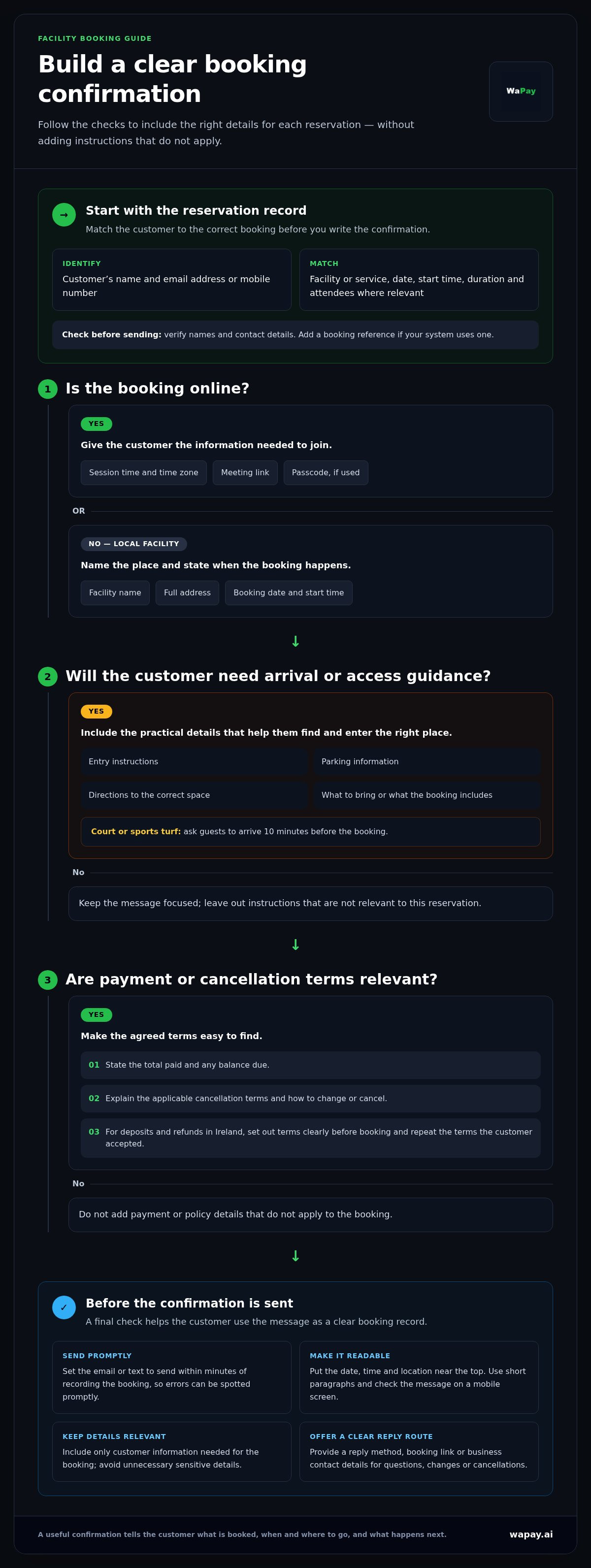
Record the customer’s name and email address or mobile number, then match them to the right reservation. Include the service or facility, booking date, start time, duration and number of attendees where relevant. For example, identify a court booking separately from a room hire. Check names and contact details before sending: a typo could mean the customer misses their confirmation or reminder.
-
Set out essential confirmation details
State the venue address, arrival instructions, parking information and booking reference, if you use one. Include the total paid, any balance due and the cancellation policy, explaining how to change or cancel. For deposits and refunds in Ireland, set out the terms clearly before booking and repeat the terms the customer accepted. A confirmation records those agreed details; whether it forms a binding contract depends on what was agreed and the message wording.
For GDPR-conscious messaging, include only customer details relevant to the booking and avoid unnecessary sensitive information. Make it easy for customers to reply, use a booking link or contact your business using the details provided to confirm, change or cancel.
- Use a booking calendar or reservation system that sends an email or text after recording a booking. Set it to send within minutes of confirmation so the customer can spot errors promptly.
- For online access, include the session time and time zone, meeting link and passcode. For example, a virtual class confirmation might state “10 am PT on Thursday” and give access passcode “45891”. For a local facility, give the correct Irish start time and any arrival instruction, such as arriving 10 minutes early. Add a relevant discount, such as 15% off a spa visit, only when it applies to that reservation.
Information included in booking confirmation emails
Use a short template to confirm the reservation, provide a clear record and explain what happens next. Tailor each message to the appointment or service booked.
- Set the confirmation email to send automatically once a booking is recorded. This delivers the details promptly and gives the customer a written reference without another manual task.
- Personalise the message with the customer’s name and the service booked. Include practical instructions, the agreed cancellation policy and a clear way to reply. For example, state that changes must be made at least 24 hours before the appointment only if that is your actual policy.
- Make the template easy to read on a mobile screen. Put the date, time and location near the top, use short paragraphs, and make any booking link easy to tap. If you send an SMS instead, remember that a standard GSM-7 segment holds 160 characters; one containing Hindi or an emoji holds 70 characters.
- Reduce no-shows by sending a reminder a day before a restaurant reservation. Repeat the date, time and any action the customer needs to take. A timely reminder gives them a simple chance to spot a clash and contact you.
Make sending confirmations part of your regular booking routine. Set up your booking workflow to put the process into practice.
Examples can make a confirmation more concrete: one gives the appointment time as 2 pm, recommends arriving 10-15 minutes before the appointment, and identifies the booking with reference #4521. Another describes a 90-minute deep tissue massage, helping the customer understand which service the booking covers.
Set expectations about follow-up as well. One confirmation example says a reminder email will be sent 15 minutes before an online class. Tour operators are advised to repeat their cancellation policies in confirmation emails and include a link to their FAQ and contact information, so customers can check the terms and know where to ask questions. Keep these details relevant to the booking, rather than adding instructions that do not apply.
Creating a general facility booking confirmation
Write a short message confirming the facility, date and time, then add useful instructions for guests. A clear template helps customers understand what they’ve booked and what to do next. For a hall, court or sports turf, tailor the message to the space and its entry arrangements.
- Open with the guest’s name and a direct confirmation, such as “Your court booking is confirmed.” Add a reference or ticket number if your booking system provides one. This gives the guest and staff a simple way to identify the reservation if a question arises.
- Name the facility and give its full address, booking date and start time. For a sports turf or court, ask guests to arrive 10 minutes before the booking. Add entry or parking directions when they help guests find the right place without needing to phone.
- Explain what the reservation includes and what guests should bring. Mention a discount only if it applies to that booking, and explain how to use it. Well-written booking confirmations for customers make practical details easy to find before they set off.
- Give a phone number or reply method for changes and cancellations. State the cancellation terms clearly, including any applicable notice requirement. Keep the message specific to the facility so customers know which terms apply to their booking.
- End with a simple sign-off, such as “We look forward to seeing you.” Before sending, check the contact details and read the message on a mobile screen. Treat booking confirmations for customers as part of the visit: clear instructions help guests arrive prepared.
WaPay: Payments
WaPay helps you manage booking administration alongside payments, invoices and bills. When a customer books a facility or service, keeping booking and payment steps organised can reduce manual follow-up.
Use WhatsApp or the WebApp to create invoices and payment links from a voice note or text message. This can help you record a booking, request payment and keep related paperwork together. Customer payments go directly to your business bank account.
WaPay can help if booking administration and payment follow-up are taking time away from your day’s work. Visit wapay.ai or contact WaPay to learn more.
Make the next booking easier
Use each booking as an opportunity to make your process clearer. A consistent confirmation format gives customers a reliable experience and helps you manage details without rebuilding every message. Well-planned booking confirmations for customers can support a smoother routine, from reservation through to payment.
Keep a master template and adapt it for each facility or service. This ensures customers receive relevant instructions, not details meant for a different booking. WaPay offers payments, invoices and bills to help organise related business administration. If you’re ready to bring these tasks into your workflow, take the next step below.
Start with the process that takes the most time today. A practical improvement can make the next booking easier to manage.
Frequently Asked Questions
Why are reservation confirmation emails important?
Reservation confirmation emails give customers a convenient reference before they travel. For example, someone arranging a group visit can forward the message so everyone has the same information. They also help staff maintain continuity when a reservation changes hands, providing a shared record of what the customer was told.
What are the best tools for sending automated booking confirmations?
Use a booking calendar or reservation system set to send an email or text automatically within minutes of confirming a booking.