The biggest benefit of VAT invoice software in Ireland is less time spent creating invoices and keeping records organised. For small businesses, the right system can make routine invoicing quicker and help keep VAT information together. Ireland’s phased e-invoicing rollout starts with VAT-registered businesses needing to receive digital invoices from 1 November 2028.
Software can reduce repetitive invoicing tasks and the paperwork left for the end of the day. The right fit depends on how you invoice, which records you need to manage, and whether you trade with businesses or consumers.
This guide explains the practical benefits of invoicing software, what Ireland’s e-invoicing changes mean for small businesses, and which features to compare. You’ll also learn how to make invoicing and payment follow-up part of a simpler daily routine.
Key Takeaways
- Choose invoicing software around how you bill, track VAT records and follow up on payments, rather than selecting features you won’t use.
- Prepare for Ireland’s phased e-invoicing rollout: VAT-registered businesses must be capable of receiving digital invoices from 1 November 2028.
- Use reminders and recurring invoices to reduce manual follow-up and keep regular billing moving.
- Turn accepted estimates into invoices with the agreed work and amounts carried through accurately.
- Compare how each system handles structured e-invoices, everyday invoicing and payment collection before settling on a workflow.
Table of Contents
What are the benefits of invoicing software for small businesses?
Invoicing software reduces manual data entry and keeps invoice and VAT records organised. In Ireland, it can also help small businesses prepare for phased e-invoicing and real-time VAT reporting.
VAT tracking and reporting
VAT tracking records the tax charged on sales and the treatment applied to each invoice. Use software to organise invoice details by VAT rate and transaction, then review the totals used for reporting. For example, check that a sale’s VAT treatment matches its invoice before relying on the figures. Clear records make each amount easier to trace to its source.
Preparing for e-invoicing and real-time VAT reporting
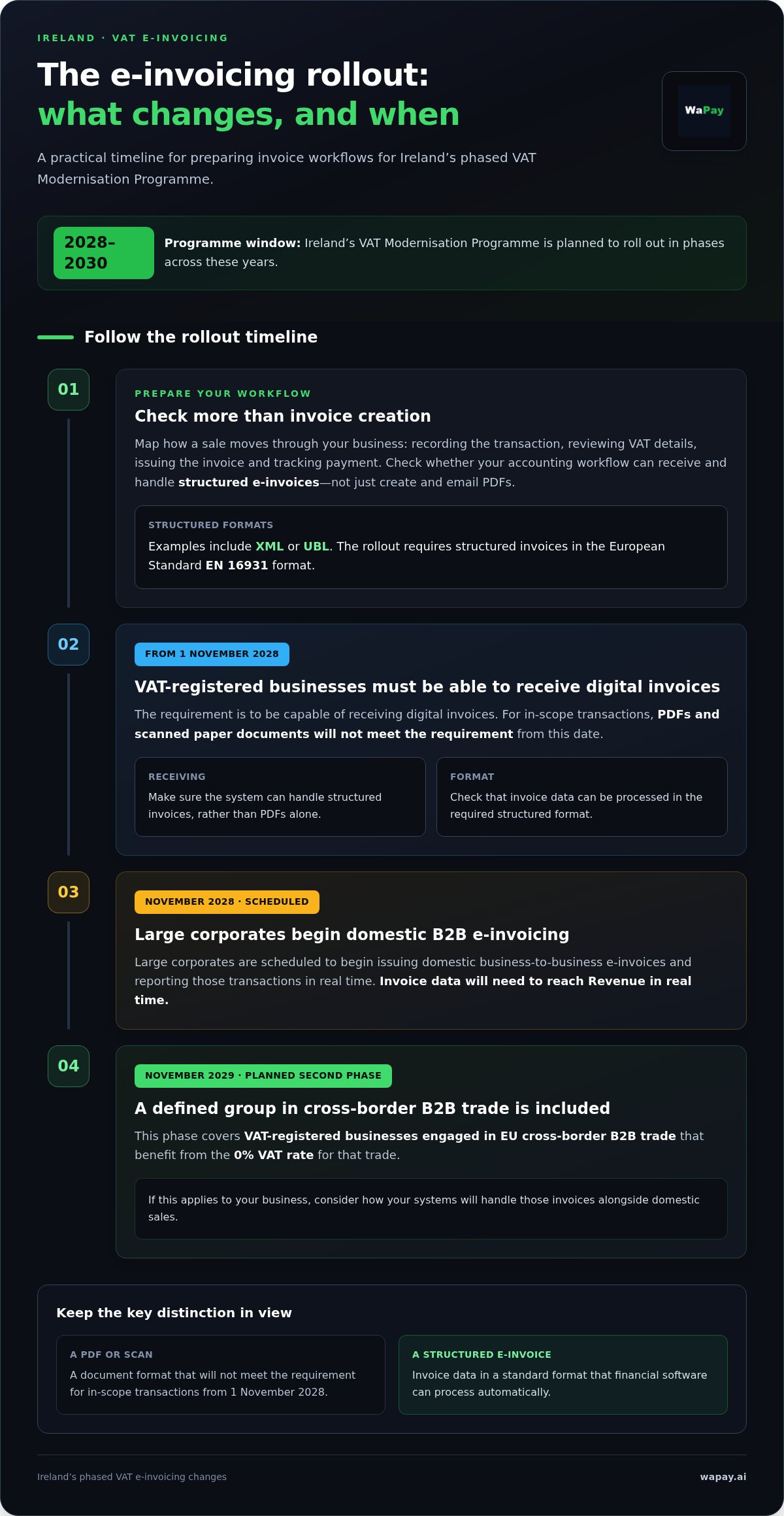
Ireland’s VAT Modernisation Programme is planned in phases between 2028 and 2030. From 1 November 2028, VAT-registered businesses must be capable of receiving digital invoices. Large corporates are scheduled to begin issuing domestic B2B e-invoices and reporting those transactions in real time in November 2028. Invoice data will need to reach Revenue in real time.
These changes make the format and handling of invoice data important. A structured e-invoice uses a standard format, such as XML or UBL, which financial software can process automatically. From 1 November 2028, PDFs and scanned paper documents will not meet the requirement for in-scope transactions. Check whether your accounting workflow can handle structured invoices, not just create and email PDFs.
Software can cut repetitive admin in everyday invoicing. Enter a customer and job once, then reuse the details to prepare an invoice and keep records consistent. This means fewer fields to retype and makes it easier to compare the invoice with the completed work. Accurate records also support cash flow planning by showing which invoices remain unpaid.
- Record each transaction: keep the invoice, VAT details and payment status together.
- Review VAT treatment: check the rate and transaction details before reporting.
- Reduce manual handling: reuse customer and service details instead of re-entering them.
- Follow outstanding invoices: use payment status to see what still needs attention.
The planned second phase starts in November 2029. It covers VAT-registered businesses engaged in EU cross-border B2B trade that benefit from the 0% VAT rate for that trade. If this applies to your business, consider how your systems will handle those invoices alongside domestic sales. Ireland’s e-invoicing rollout requires structured invoices in the European Standard EN 16931 format.
Choosing VAT invoice software in Ireland means looking beyond a tidy invoice. Map your process, from recording a sale to reviewing VAT figures and tracking payment, then compare it with the software’s invoice formats and reporting features. This helps you see where software can save time now and where your process may need to adapt to upcoming reporting requirements.
Automated reminders and recurring invoices
Software can support multiple VAT rates, reverse-charge treatment and credit notes if it includes those functions. Apply the correct treatment to each transaction, then review the invoice before sending it. This is important when your business handles standard-rate sales, different VAT treatments or adjustments for returned work.
Recurring invoicing suits regular work, such as a monthly maintenance visit or an ongoing service agreement. Save the customer, service description, agreed amount and billing frequency. Before setting a schedule, check that the work and charge still match the agreement. If the service changes, update the next invoice so an old description or amount does not carry forward.
Payment reminders bring unpaid invoices back into view without requiring you to rewrite a message each time. Set a clear sequence around the due date: send the invoice, follow up if it remains unpaid, and stop reminders once payment is recorded. For example, a customer who has paid by bank transfer should not receive another automated prompt after you mark the invoice as settled.
Automation can also keep invoice numbering orderly. Use the system’s numbering sequence consistently and review each invoice before sending it. If you cancel a draft or issue a credit note, keep the related records together so the history is easy to follow. Clear references help you match a payment, invoice and adjustment without searching through separate files.
VAT calculations rely on the information entered. Add the correct rate and taxable amount to each line, then check the total before issuing the invoice. Software can reduce arithmetic and repeated entry, but it cannot correct an incorrect rate or service detail. Review the invoice carefully, especially when a job includes items with different VAT treatments.
- For regular work: save a recurring template and review its details when the agreement changes.
- For overdue payments: use reminders that stop once you record payment.
- For adjustments: retain the credit note alongside its original invoice.
- For VAT: check the selected treatment and calculated total before sending.
Keep expenses separate from customer charges when preparing an invoice. For example, confirm whether a materials cost belongs on the customer’s bill and how it should be described. Clear records make the amount due easier to understand and the payment easier to reconcile later.
Choose automation that fits your actual billing pattern. A sole trader sending occasional invoices may need simple reminders and reliable numbering, whilst regular service work may benefit from recurring schedules. A connected invoice and payment workflow can help keep the issued invoice and its payment status together, so follow-up starts from the right record.
Revenue eInvoicing Ireland - Which Accounting Software is Ready?
Choose accounting software that suits your invoicing workflow and helps you prepare for Ireland’s upcoming e-invoicing requirements. Before moving your records, check what the system can create, send, receive and retain.
Software options for Irish small businesses
Irish businesses can compare standalone invoicing tools with broader accounting software. A trade business may prioritise mobile invoice creation, customer records and quick payment tracking. A VAT-registered business may need more detailed VAT reports and structured e-invoice handling. Assess Sage invoicing against those needs rather than assuming every package has the same features.
Software cost depends on features, invoice volume, users and integrations. The price depends on the case and is given after a quote request. Compare the full workflow, including sending invoices, storing records and exporting data. A lower-cost plan may not cover the accounting tasks your business relies on.
Before choosing, write down how you invoice today. Include the device you use on site, the records you need later and how you match payments. Then test a typical job from draft to saved invoice. This shows whether the system fits your routine as a sole trader.
Preparing for e-invoicing and business scope
Revenue announced Ireland’s phased e-invoicing rollout on 8 October 2025. From 1 November 2028, all VAT-registered businesses must be capable of receiving digital invoices. Large corporates are scheduled to start issuing domestic B2B e-invoices and reporting those transactions in real time in November 2028.
In-scope invoices must use structured formats aligned with European Standard EN 16931. PDFs and scans will not meet the requirement for in-scope transactions from 1 November 2028. Prepare by reviewing customer records, VAT identification numbers, legal business names and tax classification codes. Consistent details help prevent mismatches between systems.
Invoice requirements and deadlines
The e-invoicing milestone for receiving digital invoices is 1 November 2028 for VAT-registered businesses. The planned second phase starts in November 2029, covering VAT-registered businesses involved in qualifying EU cross-border B2B trade. These dates describe the phased rollout, not a general deadline for issuing every VAT invoice.
To create and send an invoice, enter the customer and transaction details, apply the relevant VAT treatment, then review the totals. Send it in the format required for that transaction and keep it with its supporting records. Use the customer’s legal name and VAT details consistently across your accounting records.
Security, data protection and Revenue compliance
Check how the software manages account access, protects stored customer information and lets you retrieve records. Review user permissions, backup arrangements and export options before transferring invoice data. For Revenue compliance, keep VAT records organised and traceable, and make sure the system can handle the structured formats required for in-scope e-invoices.
Test a complete example before switching: create an invoice, send it, find the saved record and export its details. Check that the invoice number, customer information, tax classification and VAT calculation stay consistent throughout. This practical run-through can reveal gaps before they affect routine reporting or preparation for Ireland’s phased rollout.
Converting estimates into invoices
An accepted estimate gives you a clear starting point for billing. Converting it into an invoice can carry the agreed work forward and reduce repeated data entry. For a sole trader pricing a repair, the estimate might list labour and materials. Before sending the invoice, compare those items with the completed job and update any agreed changes.
Use a simple sequence: find the accepted estimate, create an invoice from it, then review the details. Check the customer, work description, quantities, charges and VAT treatment. Include additional work only after the customer has agreed to the change. This keeps the invoice aligned with the transaction instead of silently changing the original estimate.
Not every estimate should become an invoice. A customer may decline, postpone or request a revised scope. Keep those estimates separate from completed work so your sales records do not treat an unapproved quote as income. For example, mark a declined garden-maintenance estimate accordingly, then invoice only after the customer accepts and the work proceeds.
When comparing tools such as Joist Estimates and Invoicing or QuickBooks, focus on the handover from estimate to invoice. Check whether you can find the original scope, see what changed and identify the final amount billed. A product’s name or category does not guarantee a particular workflow, so test it with a realistic job before relying on it.
- Match the scope: compare accepted estimate lines with completed work.
- Record changes: keep agreed additions separate from the original scope.
- Review VAT: check the treatment on each invoice line before sending.
- Track status: distinguish accepted, declined and invoiced estimates.
Recurring invoices need a separate check. A recurring charge may suit a fixed service agreement, but it should not replace a job-specific estimate when the work changes each visit. For example, a regular inspection could use a consistent invoice description, while a one-off repair needs its own agreed scope and charges. Confirm the customer and work details each time.
Keep the estimate and resulting invoice easy to trace. Use a clear reference or customer record, then store any approval or change alongside the transaction. If a customer queries a charge, compare the original estimate with the invoice to explain what changed. This can also help you spot missing items before sending an invoice.
Before adopting estimate-to-invoice software, run a sample job from pricing through to payment. Create the estimate, record customer approval, convert it, review the VAT details and save the final invoice. Check that the record shows the agreed work without duplicate data entry. This practical test reveals whether the process fits your trade and day-to-day paperwork.
Choosing software by invoicing needs
Start with the jobs your software needs to handle, not the longest feature list. A sole trader repairing boilers may need to create professional invoices on site, record VAT and track payments. A consultant billing regular work may value templates and recurring invoices instead. The best fit supports your real routine without adding unnecessary steps.
Map your process from completed work to payment. Note where you enter customer details, calculate charges, send invoices and record transactions. For example, if you rewrite the same service description for each call-out, reusable templates could cut repeat typing. If the job scope often changes, prioritise easy editing and a clear record of revisions.
Check how the system handles details that affect your records. Test an invoice with separate line items, the correct VAT treatment and a payment status, then find the same transaction later. Clear records make VAT reporting easier to review and help you spot unpaid invoices without searching through emails or paper files.
- For mobile work: test whether you can create and send an invoice from your usual device.
- For repeat customers: see whether saved details and templates fit your billing pattern.
- For changing jobs: check how edits and customer approvals appear in the record.
- For payment follow-up: confirm you can identify which invoices remain unpaid.
Consider how invoices connect with the rest of your business records. A builder might want materials and labour shown clearly on one customer invoice. A service provider may need recurring invoices for agreed regular work. In either case, make sure invoice details are easy to trace back to the job and its payment.
Preparation for Ireland’s e-invoicing rollout belongs in the decision too. The required structured format for in-scope invoices is European Standard EN 16931. Ask whether the workflow can create, send or receive structured invoices where required, rather than relying only on PDFs. Also consider whether customer and VAT details can be maintained consistently across your records.
Run a realistic test before settling on a system. Create a sample invoice for completed work, review its VAT details, send it, then find the saved record and payment status. Check each step against your actual working day. A system that speeds up one task but complicates the rest may not be the right fit.
Choose the essentials first, then add features only where they remove a real bottleneck. If you’re ready to streamline invoice handling, explore a simpler invoicing workflow.
WaPay: Payments
WaPay helps sole traders manage invoices and payments through WhatsApp or its WebApp. Create an invoice or payment link from a voice note or text message, then keep the invoice and payment details together. Payment reminders and VAT records can reduce routine administration after a job is finished.
WaPay is a practical next step if you want to move from preparing invoices to following up payments without downloading another app or paying a subscription. Customer payments go directly to your business bank account. WaPay supports day-to-day invoicing and payment handling, not accounting or tax filing.
Visit wapay.ai to see how WaPay could fit your invoicing workflow.
Make the next invoice easier
Choose a system that fits the way you work now, then build a routine you can keep using as your business grows. The right VAT invoice software in Ireland should support the practical steps that matter to you, from preparing invoices to keeping business records organised.
WaPay brings invoices, payments and bills into everyday business administration. If you want a straightforward way to manage those tasks alongside your existing workflow, explore how WaPay could fit your business. You can try the service without changing your whole process at once.
Contact WaPay about your invoicing needs and take a practical step towards less paperwork and more time for the work itself.
Frequently Asked Questions
What is legally required on an invoice?
An invoice should clearly identify who supplied the goods or service, what was supplied and the amount charged. For a VAT transaction, show the VAT treatment and amount so the customer can understand the total. Include clear invoice and customer references to help trace the transaction later. Use this as a practical checklist, then compare your invoice format with Irish Revenue requirements for your transaction type.
What information must an Irish VAT invoice include under Revenue rules?
Record the supplier’s legal business name and VAT identification number, the customer’s details, the invoice date and reference, and a clear description of the goods or services. Include the taxable amount, applicable VAT treatment and VAT charged, alongside the total due. Keep names and VAT identification numbers consistent across your records. This makes each transaction easier to identify and review for VAT reporting.
Which VAT invoice software is available for businesses in Ireland?
Irish businesses can choose standalone invoicing tools, accounting software with invoicing, or mobile-first workflows. Sage and QuickBooks are examples to compare for invoicing and accounting features. WaPay supports invoice creation through WhatsApp or its WebApp, including from voice notes or text messages. Choose based on how you prepare invoices, organise records and track payments, rather than the length of a software feature list.
Which Irish VAT invoice software integrates with accounting, payments, and e-invoicing systems?
Integration depends on the software and the systems your business uses, so compare the specific connections each option provides. Check, for example, whether invoice data can flow into your accounting workflow and whether payment status can be matched to the invoice. WaPay creates invoices and payment links through WhatsApp or its WebApp. Customers can pay through WaPay by bank transfer, card, Apple Pay or Google Pay.
What are Ireland’s VAT record-keeping and digital record requirements for invoices?
Irish businesses will need to store VAT records digitally in line with updated compliance standards. Keep invoice data organised so each reported amount can be traced to its transaction and supporting details. For example, retain the invoice record with customer information, VAT treatment and payment status. A consistent digital filing process makes records easier to retrieve for routine reporting and review.
Is e-invoicing mandatory in Ireland, and what are the current and upcoming rules?
Ireland’s rollout is phased. Structured B2B e-invoices currently require both parties’ agreement before sending, and consumer-facing B2C transactions are not currently in scope. From 1 November 2028, VAT-registered businesses must be capable of receiving digital invoices. The planned second phase starts in November 2029 for VAT-registered businesses engaged in qualifying EU cross-border B2B trade. In-scope invoices require structured formats, not PDFs or scans.
When must Irish businesses issue VAT invoices, and what are the deadlines?
From 1 November 2028, VAT-registered businesses must be capable of receiving digital invoices, and large corporates are scheduled to begin issuing domestic B2B e-invoices in November 2028. The planned second phase starts in November 2029 for qualifying EU cross-border B2B trade; full cross-border implementation under ViDA is set for July 2030.
Frequently asked questions
What is legally required on an invoice?
An invoice should clearly identify who supplied the goods or service, what was supplied and the amount charged. For a VAT transaction, show the VAT treatment and amount so the customer can understand the total. Include clear invoice and customer references to help trace the transaction later. Use this as a practical checklist, then compare your invoice format with Irish Revenue requirements for your transaction type.
What information must an Irish VAT invoice include under Revenue rules?
Record the supplier’s legal business name and VAT identification number, the customer’s details, the invoice date and reference, and a clear description of the goods or services. Include the taxable amount, applicable VAT treatment and VAT charged, alongside the total due. Keep names and VAT identification numbers consistent across your records. This makes each transaction easier to identify and review for VAT reporting.
Which VAT invoice software is available for businesses in Ireland?
Irish businesses can choose standalone invoicing tools, accounting software with invoicing, or mobile-first workflows. Sage and QuickBooks are examples to compare for invoicing and accounting features. WaPay supports invoice creation through WhatsApp or its WebApp, including from voice notes or text messages. Choose based on how you prepare invoices, organise records and track payments, rather than the length of a software feature list.
Which Irish VAT invoice software integrates with accounting, payments, and e-invoicing systems?
Integration depends on the software and the systems your business uses, so compare the specific connections each option provides. Check, for example, whether invoice data can flow into your accounting workflow and whether payment status can be matched to the invoice. WaPay creates invoices and payment links through WhatsApp or its WebApp. Customers can pay through WaPay by bank transfer, card, Apple Pay or Google Pay.
What are Ireland’s VAT record-keeping and digital record requirements for invoices?
Irish businesses will need to store VAT records digitally in line with updated compliance standards. Keep invoice data organised so each reported amount can be traced to its transaction and supporting details. For example, retain the invoice record with customer information, VAT treatment and payment status. A consistent digital filing process makes records easier to retrieve for routine reporting and review.
Is e-invoicing mandatory in Ireland, and what are the current and upcoming rules?
Ireland’s rollout is phased. Structured B2B e-invoices currently require both parties’ agreement before sending, and consumer-facing B2C transactions are not currently in scope. From 1 November 2028, VAT-registered businesses must be capable of receiving digital invoices. The planned second phase starts in November 2029 for VAT-registered businesses engaged in qualifying EU cross-border B2B trade. In-scope invoices require structured formats, not PDFs or scans.
When must Irish businesses issue VAT invoices, and what are the deadlines?
From 1 November 2028, VAT-registered businesses must be capable of receiving digital invoices, and large corporates are scheduled to begin issuing domestic B2B e-invoices in November 2028. The planned second phase starts in November 2029 for qualifying EU cross-border B2B trade; full cross-border implementation under ViDA is set for July 2030.