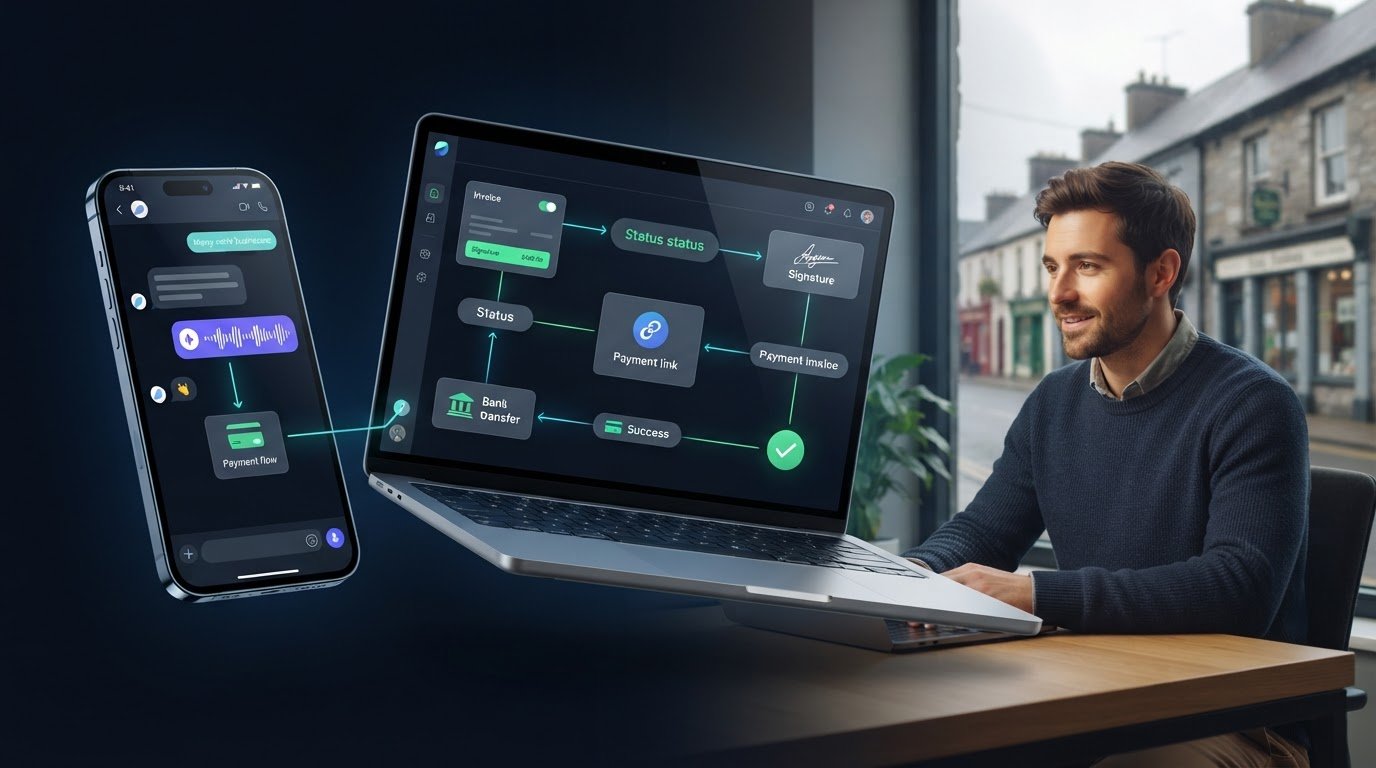
The message isn’t the hard part. Getting the invoice out, making payment options clear and keeping follow-up organised can be. WhatsApp invoicing software gives Irish small businesses a way to start that process through a familiar channel. With WaPay, a text message or voice note can be used to create an invoice and payment link, so admin doesn’t have to wait until the working day is over.
An emailed invoice can be missed, and a WhatsApp message on its own won’t keep invoice activity in order. A useful workflow connects the invoice to clear ways to pay, with reminders and a simple view of what’s happening. WaPay works through WhatsApp or its WebApp, and customers can pay by bank transfer, card, Apple Pay or Google Pay. Payments go directly to your business bank account.
This guide explains how WhatsApp invoicing works, what to compare when choosing software and how to build a practical invoice-to-payment routine without adding admin. It also distinguishes invoicing tools from accounting or tax-filing software, so you can choose the right tool for each job.
Key Takeaways
- WhatsApp invoicing software can bring invoice creation, sharing and payment follow-up into one workflow, but invoice details still need a careful review.
- Use voice notes or text to capture job details, then check the prepared invoice before sending it to the customer.
- Compare WhatsApp-led invoicing, email and accounting tools by how each handles customer communication, invoice preparation, payment follow-up and records.
- Choose a workflow that suits how your customers communicate and makes invoice activity easy to track alongside your existing records.
- WaPay lets Irish small businesses create invoices and payment links from text or voice notes through WhatsApp or its WebApp, without a separate app download or subscription.
Table of Contents
- WhatsApp invoicing software: what it does for a small business
- From voice note to payment request: what the software should handle
- WhatsApp invoicing software compared with email and accounting tools
- How to assess WhatsApp invoicing software for an Irish business
- How WaPay brings invoicing and payments into one practical workflow
WhatsApp invoicing software: what it does for a small business
For a small operator, the job often ends before the paperwork does. You finish a call-out, pack the van and head to the next job, while the invoice is still waiting to be written, checked and sent. WhatsApp invoicing software brings those tasks into a messaging-based workflow, helping you create, share and track invoices through a channel you may already use with customers.
WhatsApp is the delivery route, not a substitute for a proper invoice. The document still needs accurate details about the business, customer, work completed, amount due and any applicable VAT information. A quick voice note can capture the job while it’s fresh, but it shouldn’t replace checking the finished invoice before it goes out.
An invoice can also be linked to a payment request, making it easier for the customer to see how to pay. Payment options and settlement times depend on the method used, so sending a request doesn’t guarantee when the money will arrive. This is a practical form of mobile payment: a phone helps connect the customer with a way to make a payment.
How does a WhatsApp invoice workflow work?
A useful sequence is simple: record what happened, prepare the invoice, check it, send it, then monitor its payment status. Text or a voice note can capture key job details while you’re on the move. Before sharing, check names, amounts and other invoice information. If the invoice includes a payment request, make the available method clear without implying that payment will arrive immediately.
Illustrative example: A sole trader finishes a repair and makes a short voice note with the customer’s details and work completed. They use that information to prepare and review an invoice, then share it with the customer in WhatsApp. The customer can see the amount due and the payment option provided. The trader can then record whether the invoice remains outstanding or has been paid.
Who benefits most from invoicing through WhatsApp?
This approach can suit sole traders and small operators who already arrange jobs and discuss work with customers by message. It gives them a way to capture invoice information between jobs rather than relying on memory at the end of a long day. That can make it easier to start the task, particularly when a computer isn’t close by.
It doesn’t remove the need for review or a sensible recordkeeping routine. Businesses with established finance processes can use messaging to send an invoice while keeping formal records and bookkeeping in their existing accounting system. Invoicing and payment administration help manage what’s owed and follow up on it. They aren’t business banking, accounting or tax-filing services. Keeping those roles clear helps the workflow stay useful without expecting a messaging tool to do a different job.
From voice note to payment request: what the software should handle
A useful workflow doesn’t stop at turning a message into an invoice. It should help you move from job details to a reviewed invoice, give the customer a clear way to pay, then make follow-up easier to manage. WhatsApp invoicing software can support that chain, but it shouldn’t replace your judgement. Treat voice notes and texts as starting points, not proof that every detail is correct.
Keep the process in order:
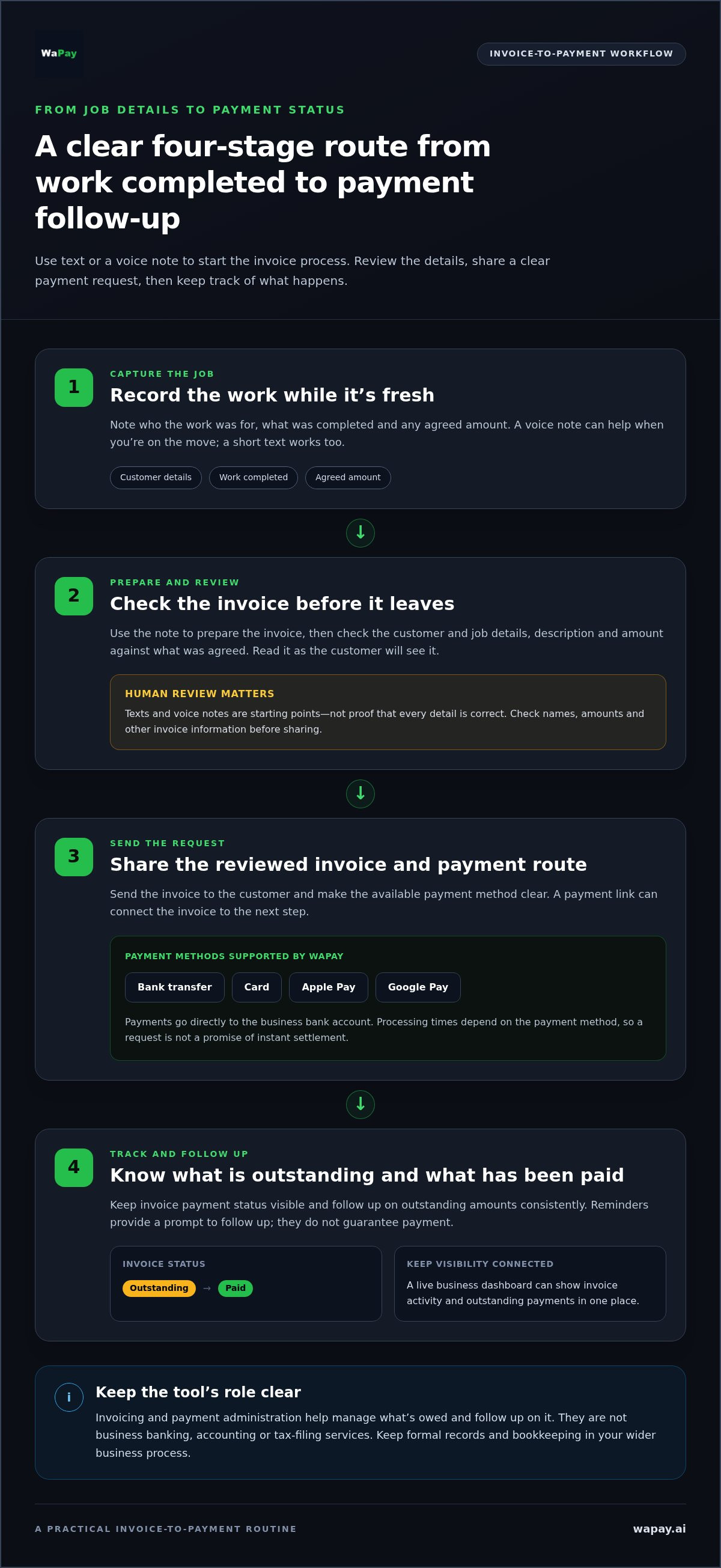
- Capture the job. Record who the work was for, what was completed and any agreed amount. A voice note is handy on the move; a short text can work just as well.
- Prepare the invoice. Use those notes to create the invoice, then check the customer and job details, description and amount against what was agreed.
- Send the request. Share the reviewed invoice with the customer and make the available payment route clear. A payment link can connect the invoice to the next step.
- Track what happens. Keep the invoice’s payment status visible and follow up on outstanding amounts in a consistent way.
What should happen between a job and a sent invoice?
Start with a useful record, not a hurried guess. Note the work completed and any relevant agreement while the details are fresh. Before sending, read the invoice as the customer will see it. Check that it describes the work clearly and that the amount matches your agreement. A brief human review can catch errors that a voice note or text can’t reliably prevent.
Keep this check focused on accuracy. A messaging workflow can help prepare and share an invoice, but it can’t determine what work was agreed or replace your responsibility for reviewing customer-facing information.
How should payment tracking and reminders fit in?
A payment link gives a customer a route to pay without having to search through a separate message for instructions. WaPay supports bank transfer, card, Apple Pay and Google Pay, and payments go directly to the business’s bank account. Processing times depend on the method, so don’t present a payment request as a promise of instant settlement.
Payment reminders provide a prompt to follow up, not a guarantee that the customer will pay. A live business dashboard can help you see invoice activity and outstanding payments in one place, so follow-up doesn’t rely on memory or a trail of old chats. Keep that visibility connected to your wider business records, too. It supports payment administration, but it isn’t a substitute for accounting or tax-filing processes.
WaPay brings invoice creation, payment links, reminders and business activity into one workflow. See how WaPay’s invoice and payment workflow works.
WhatsApp invoicing software compared with email and accounting tools
The right channel depends on how your customers work and how you manage business records. WhatsApp can make an invoice easier to share in an active customer conversation. Email offers a familiar written route, while accounting software supports broader financial records. These roles can overlap, but they aren’t interchangeable.
| Area | WhatsApp-led invoicing | Email-led invoicing | Accounting software |
|---|---|---|---|
| Customer communication | Shares invoice information through a messaging channel the customer may already use. | Sends the invoice to the customer’s email address, often as an attachment or document. | May send invoices directly or support another delivery method, depending on the system. |
| Invoice preparation | Can help create invoices within a messaging-led workflow. Details still need review. | The invoice is prepared separately, then attached or sent through email software. | Can prepare invoices as part of a wider financial recordkeeping process. |
| Payment follow-up | May bring payment requests and reminders into the messaging workflow. | Follow-up usually happens through further emails or another channel. | Follow-up options vary. Payment activity can sit alongside wider financial records. |
| Recordkeeping role | Helps organise invoice and payment activity; it isn’t automatically a complete accounting system. | Provides a correspondence trail, but the business may need to organise records elsewhere. | Supports bookkeeping and financial reporting as well as invoicing, depending on the system. |
Convenience doesn’t determine whether an invoice is accurate or meets requirements that apply to your business. The delivery channel is only one part of the process. Prepare the invoice with correct information, review it before sending and keep suitable business records. A message, email or payment link on its own doesn’t settle those responsibilities.
When is WhatsApp a useful invoice channel?
WhatsApp can fit neatly when you and your customers already use it for routine business messages. It keeps invoice communication in a familiar place instead of leaving paperwork until you’re back at a desk. But not every customer wants invoices by chat. Some organisations may have a preferred email address or supplier portal, so use a channel that fits the customer and the way you handle records.
A WhatsApp message isn’t proof that an invoice has been seen, accepted or acted on. Keep your follow-up process clear, and don’t rely on the delivery channel alone to confirm payment.
Does WhatsApp invoicing replace accounting software?
No. WhatsApp-led invoicing can support invoice creation, delivery and payment administration. Accounting software serves a broader role in bookkeeping and financial reporting. WaPay helps manage invoices, payment links, reminders and business activity, but it isn’t an accounting or tax-filing service.
Make the handover between tools part of your process. Keep invoice and payment activity organised alongside your existing records, and use the right systems for each job. That lets you communicate with customers through messaging without mistaking it for your full finance process.
How to assess WhatsApp invoicing software for an Irish business
Choose a workflow that solves a real delay, rather than adding another place to check. Before settling on WhatsApp invoicing software, map how an invoice moves through your business now: how you capture job details, prepare and review the invoice, send it, follow up and keep the record. Then identify the friction you can remove without losing sight of the details that matter.
Use this checklist to compare options against your everyday process:
- Customer habits: Do your customers already use WhatsApp for business messages, or do they expect invoices by email or through a supplier portal?
- Time-consuming tasks: Does the workflow help with the actual bottleneck, such as creating invoices between jobs, sending payment requests or keeping reminders organised?
- Invoice review: Can you check the customer, work description and amount before sharing the invoice?
- Payment visibility: Can you see which invoices need attention and which have been marked as paid?
- Existing records: How will invoice and payment activity sit alongside the records and accounting process you already use?
- Access and terms: Is there an app to download or a subscription? Read the provider’s pricing and terms, including any charges that may apply to your use. Don’t assume a particular fee unless it is stated.
Which customer and workflow needs should guide the choice?
Start with your customers. If they regularly message you on WhatsApp, it may be a natural channel for invoice communication. If they prefer email or a supplier portal, build that into your process too. Next, focus on the daily snag: choose a workflow that helps with invoice preparation, reminders or payment tracking you actually need. Plan how its records will sit alongside your existing accounting process.
What should Irish businesses check about VAT and records?
Check current invoice, VAT and recordkeeping guidance from the Irish Revenue Commissioners for your circumstances. Don’t rely on a software description or the delivery channel as compliance advice. A WhatsApp message can carry an invoice, but it can’t make inaccurate information correct. Keep the invoice review separate from the question of how your business maintains its formal records.
Keep the roles clear. Invoicing and payment administration can help you prepare requests and monitor activity; they aren’t a replacement for accounting or tax-filing processes. WaPay supports invoice and payment administration, with no subscription or app to download. Consider whether its workflow fits the way you work.
Explore WaPay’s invoicing workflow to see how it can help manage invoices and payment activity.
How WaPay brings invoicing and payments into one practical workflow
Once you know where invoices get held up, it’s easier to judge whether a messaging-led process will help. WaPay helps Irish small businesses manage everyday admin through WhatsApp or its WebApp. Send a voice note or text to start creating an invoice and payment link, then review the details before sharing them with your customer.
The aim is to connect useful admin tasks in one workflow, not to turn a message into a substitute for checking your work. WaPay also supports quotes, bookings and bills, with payment reminders, VAT records and a live business dashboard. This gives you a view of day-to-day activity without suggesting every part of business finance belongs in a messaging tool.
What can WaPay help a small business manage?
WaPay brings invoices and payment administration together with quotes, bookings and bills. Payment reminders support follow-up, while VAT records and the live dashboard help keep business activity visible. These are practical admin tools, not accounting or tax-filing services. WaPay isn’t a business bank either. Customer payments go directly to your business bank account.
Customers can pay by bank transfer, card, Apple Pay or Google Pay. The available method doesn’t promise a particular settlement time. WaPay has no subscription and there’s no app to download, so you can use it through WhatsApp or its WebApp. Payment processing fees apply, so take them into account when assessing the service.
Before deciding, match the tools to the jobs that currently take up your time:
- Invoices: Start invoice creation from a text message or voice note, then check the details before sending.
- Payment requests: Connect an invoice with a payment link and make the available payment options clear to the customer.
- Follow-up: Use payment reminders to support a consistent routine, without treating them as a guarantee of payment.
- Business visibility: Use the live dashboard and VAT records to keep relevant activity in view alongside your existing recordkeeping process.
What is the next step for a business considering WaPay?
Pinpoint the snag first. If job details sit in your messages but invoices wait until you’re back at a desk, voice or text inputs may suit your routine. If outstanding payments are hard to track, reminders and a dashboard may be more relevant. Keep your existing accounting and tax-filing processes separate, and consider how WaPay fits your workflow.
WaPay has no subscription, and payment processing fees apply. If the workflow fits the admin your business needs to handle, explore WaPay for your business.
Make your next invoice easier to send
Test your invoice routine against a real working day. Notice where a job’s details get left behind, when the invoice is finally prepared and what makes payment follow-up slip. Then choose a process that fits how you serve customers, rather than adding another admin task to manage.
WaPay lets you manage invoices through WhatsApp or its WebApp, with no app to download and no subscription. Customers can pay by bank transfer, card, Apple Pay or Google Pay, with payments going directly to your business bank account. Payment processing fees apply, and your accounting and tax processes remain separate.
Explore WaPay and simplify your invoice-to-payment workflow. A smoother routine can start with getting the next invoice out while the job is still fresh, rather than catching up on paperwork later.
Frequently Asked Questions
Is WhatsApp invoicing software suitable for a sole trader?
Yes, it can suit a sole trader who already uses WhatsApp with customers and wants a steadier way to handle invoices. After a job, for example, note the work and agreed amount, then review the prepared invoice before sending it. Keep invoice records organised with your wider business paperwork. A messaging workflow can support admin, but it doesn’t replace accounting processes or tax advice.
Can WhatsApp invoicing software replace accounting software?
No. WhatsApp invoicing software can help prepare invoices, share them and keep payment activity in view. Accounting software has a broader role in organising financial records and producing reports. A practical setup might use messaging for customer communication while keeping bookkeeping in the system already used by the business. An invoicing tool alone doesn’t cover accounts or tax filing.
Is an invoice sent on WhatsApp valid for Irish VAT records?
The channel alone doesn’t establish whether an invoice meets Irish VAT requirements. The invoice information and your recordkeeping process matter. Before relying on a particular format, check current guidance from the Irish Revenue Commissioners. If you spot an error, correct the invoice and keep your records clear about which version is current. For VAT-related corrections, follow current Revenue guidance for your circumstances.
Can I send an invoice to a customer who doesn’t use WhatsApp?
You can use a different agreed channel if a customer doesn’t use WhatsApp or prefers another route. Some organisations direct suppliers to email or a purchasing portal. Set out how you’ll handle these cases before sending invoices, and record where each one was sent so you can follow up consistently.
What should I do if I send an invoice with incorrect details?
Correct the information promptly and make sure the customer receives the corrected invoice or details. If you’ve already sent a payment request, clarify which invoice the customer should use. Keep your own records clear about the correction and current version, rather than leaving two documents that appear equally valid. If the mistake affects VAT records, check current Irish Revenue guidance on the appropriate correction process.
Does WhatsApp invoicing guarantee that customers will pay faster?
No. A message, payment link or reminder can make the next step clearer, but it can’t guarantee when a customer will pay. Put the agreed payment terms where the customer can easily find them, then use your records to identify outstanding invoices and follow up consistently. If a payment is delayed, keep communication factual and note any agreed next steps so you have a clear record.
Do customers need to download an app to pay a WaPay invoice?
WaPay requires no app download for the business to use its service through WhatsApp or the WebApp. Customers can pay by bank transfer, card, Apple Pay or Google Pay. Don’t promise instant settlement, as processing time can depend on the method.
Frequently asked questions
How does a WhatsApp invoice workflow work?
A useful sequence is simple: record what happened, prepare the invoice, check it, send it, then monitor its payment status. Text or a voice note can capture key job details while you’re on the move. Before sharing, check names, amounts and other invoice information. If the invoice includes a payment request, make the available method clear without implying that payment will arrive immediately. Illustrative example: A sole trader finishes a repair and makes a short voice note with the customer’s details and work completed. They use that information to prepare and review an invoice, then share it with the customer in WhatsApp. The customer can see the amount due and the payment option provided. The trader can then record whether the invoice remains outstanding or has been paid.
Who benefits most from invoicing through WhatsApp?
This approach can suit sole traders and small operators who already arrange jobs and discuss work with customers by message. It gives them a way to capture invoice information between jobs rather than relying on memory at the end of a long day. That can make it easier to start the task, particularly when a computer isn’t close by. It doesn’t remove the need for review or a sensible recordkeeping routine. Businesses with established finance processes can use messaging to send an invoice while keeping formal records and bookkeeping in their existing accounting system. Invoicing and payment administration help manage what’s owed and follow up on it. They aren’t business banking, accounting or tax-filing services. Keeping those roles clear helps the workflow stay useful without expecting a messaging tool to do a different job. A useful workflow doesn’t stop at turning a message into an invoice. It should help you move from job details to a reviewed invoice, give the customer a clear way to pay, then make follow-up easier to manage. WhatsApp invoicing software can support that chain, but it shouldn’t replace your judgement. Treat voice notes and texts as starting points, not proof that every detail is correct. Keep the process in order:
What should happen between a job and a sent invoice?
Start with a useful record, not a hurried guess. Note the work completed and any relevant agreement while the details are fresh. Before sending, read the invoice as the customer will see it. Check that it describes the work clearly and that the amount matches your agreement. A brief human review can catch errors that a voice note or text can’t reliably prevent. Keep this check focused on accuracy. A messaging workflow can help prepare and share an invoice, but it can’t determine what work was agreed or replace your responsibility for reviewing customer-facing information.
How should payment tracking and reminders fit in?
A payment link gives a customer a route to pay without having to search through a separate message for instructions. WaPay supports bank transfer, card, Apple Pay and Google Pay, and payments go directly to the business’s bank account. Processing times depend on the method, so don’t present a payment request as a promise of instant settlement. Payment reminders provide a prompt to follow up, not a guarantee that the customer will pay. A live business dashboard can help you see invoice activity and outstanding payments in one place, so follow-up doesn’t rely on memory or a trail of old chats. Keep that visibility connected to your wider business records, too. It supports payment administration, but it isn’t a substitute for accounting or tax-filing processes. WaPay brings invoice creation, payment links, reminders and business activity into one workflow. See how WaPay’s invoice and payment workflow works. The right channel depends on how your customers work and how you manage business records. WhatsApp can make an invoice easier to share in an active customer conversation. Email offers a familiar written route, while accounting software supports broader financial records. These roles can overlap, but they aren’t interchangeable. Convenience doesn’t determine whether an invoice is accurate or meets requirements that apply to your business. The delivery channel is only one part of the process. Prepare the invoice with correct information, review it before sending and keep suitable business records. A message, email or payment link on its own doesn’t settle those responsibilities.
When is WhatsApp a useful invoice channel?
WhatsApp can fit neatly when you and your customers already use it for routine business messages. It keeps invoice communication in a familiar place instead of leaving paperwork until you’re back at a desk. But not every customer wants invoices by chat. Some organisations may have a preferred email address or supplier portal, so use a channel that fits the customer and the way you handle records. A WhatsApp message isn’t proof that an invoice has been seen, accepted or acted on. Keep your follow-up process clear, and don’t rely on the delivery channel alone to confirm payment.
Does WhatsApp invoicing replace accounting software?
No. WhatsApp-led invoicing can support invoice creation, delivery and payment administration. Accounting software serves a broader role in bookkeeping and financial reporting. WaPay helps manage invoices, payment links, reminders and business activity, but it isn’t an accounting or tax-filing service. Make the handover between tools part of your process. Keep invoice and payment activity organised alongside your existing records, and use the right systems for each job. That lets you communicate with customers through messaging without mistaking it for your full finance process. Choose a workflow that solves a real delay, rather than adding another place to check. Before settling on WhatsApp invoicing software, map how an invoice moves through your business now: how you capture job details, prepare and review the invoice, send it, follow up and keep the record. Then identify the friction you can remove without losing sight of the details that matter. Use this checklist to compare options against your everyday process:
Which customer and workflow needs should guide the choice?
Start with your customers. If they regularly message you on WhatsApp, it may be a natural channel for invoice communication. If they prefer email or a supplier portal, build that into your process too. Next, focus on the daily snag: choose a workflow that helps with invoice preparation, reminders or payment tracking you actually need. Plan how its records will sit alongside your existing accounting process.
What should Irish businesses check about VAT and records?
Check current invoice, VAT and recordkeeping guidance from the Irish Revenue Commissioners for your circumstances. Don’t rely on a software description or the delivery channel as compliance advice. A WhatsApp message can carry an invoice, but it can’t make inaccurate information correct. Keep the invoice review separate from the question of how your business maintains its formal records. Keep the roles clear. Invoicing and payment administration can help you prepare requests and monitor activity; they aren’t a replacement for accounting or tax-filing processes. WaPay supports invoice and payment administration, with no subscription or app to download. Consider whether its workflow fits the way you work. Explore WaPay’s invoicing workflow to see how it can help manage invoices and payment activity. Once you know where invoices get held up, it’s easier to judge whether a messaging-led process will help. WaPay helps Irish small businesses manage everyday admin through WhatsApp or its WebApp. Send a voice note or text to start creating an invoice and payment link, then review the details before sharing them with your customer. The aim is to connect useful admin tasks in one workflow, not to turn a message into a substitute for checking your work. WaPay also supports quotes, bookings and bills, with payment reminders, VAT records and a live business dashboard. This gives you a view of day-to-day activity without suggesting every part of business finance belongs in a messaging tool.
What can WaPay help a small business manage?
WaPay brings invoices and payment administration together with quotes, bookings and bills. Payment reminders support follow-up, while VAT records and the live dashboard help keep business activity visible. These are practical admin tools, not accounting or tax-filing services. WaPay isn’t a business bank either. Customer payments go directly to your business bank account. Customers can pay by bank transfer, card, Apple Pay or Google Pay. The available method doesn’t promise a particular settlement time. WaPay has no subscription and there’s no app to download, so you can use it through WhatsApp or its WebApp. Payment processing fees apply, so take them into account when assessing the service. Before deciding, match the tools to the jobs that currently take up your time:
What is the next step for a business considering WaPay?
Pinpoint the snag first. If job details sit in your messages but invoices wait until you’re back at a desk, voice or text inputs may suit your routine. If outstanding payments are hard to track, reminders and a dashboard may be more relevant. Keep your existing accounting and tax-filing processes separate, and consider how WaPay fits your workflow. WaPay has no subscription, and payment processing fees apply. If the workflow fits the admin your business needs to handle, explore WaPay for your business. Test your invoice routine against a real working day. Notice where a job’s details get left behind, when the invoice is finally prepared and what makes payment follow-up slip. Then choose a process that fits how you serve customers, rather than adding another admin task to manage. WaPay lets you manage invoices through WhatsApp or its WebApp, with no app to download and no subscription. Customers can pay by bank transfer, card, Apple Pay or Google Pay, with payments going directly to your business bank account. Payment processing fees apply, and your accounting and tax processes remain separate. Explore WaPay and simplify your invoice-to-payment workflow. A smoother routine can start with getting the next invoice out while the job is still fresh, rather than catching up on paperwork later.
Is WhatsApp invoicing software suitable for a sole trader?
Yes, it can suit a sole trader who already uses WhatsApp with customers and wants a steadier way to handle invoices. After a job, for example, note the work and agreed amount, then review the prepared invoice before sending it. Keep invoice records organised with your wider business paperwork. A messaging workflow can support admin, but it doesn’t replace accounting processes or tax advice.
Can WhatsApp invoicing software replace accounting software?
No. WhatsApp invoicing software can help prepare invoices, share them and keep payment activity in view. Accounting software has a broader role in organising financial records and producing reports. A practical setup might use messaging for customer communication while keeping bookkeeping in the system already used by the business. An invoicing tool alone doesn’t cover accounts or tax filing.
Is an invoice sent on WhatsApp valid for Irish VAT records?
The channel alone doesn’t establish whether an invoice meets Irish VAT requirements. The invoice information and your recordkeeping process matter. Before relying on a particular format, check current guidance from the Irish Revenue Commissioners. If you spot an error, correct the invoice and keep your records clear about which version is current. For VAT-related corrections, follow current Revenue guidance for your circumstances.
Can I send an invoice to a customer who doesn’t use WhatsApp?
You can use a different agreed channel if a customer doesn’t use WhatsApp or prefers another route. Some organisations direct suppliers to email or a purchasing portal. Set out how you’ll handle these cases before sending invoices, and record where each one was sent so you can follow up consistently.
What should I do if I send an invoice with incorrect details?
Correct the information promptly and make sure the customer receives the corrected invoice or details. If you’ve already sent a payment request, clarify which invoice the customer should use. Keep your own records clear about the correction and current version, rather than leaving two documents that appear equally valid. If the mistake affects VAT records, check current Irish Revenue guidance on the appropriate correction process.
Does WhatsApp invoicing guarantee that customers will pay faster?
No. A message, payment link or reminder can make the next step clearer, but it can’t guarantee when a customer will pay. Put the agreed payment terms where the customer can easily find them, then use your records to identify outstanding invoices and follow up consistently. If a payment is delayed, keep communication factual and note any agreed next steps so you have a clear record.
Do customers need to download an app to pay a WaPay invoice?
WaPay requires no app download for the business to use its service through WhatsApp or the WebApp. Customers can pay by bank transfer, card, Apple Pay or Google Pay. Don’t promise instant settlement, as processing time can depend on the method.