A wrong VAT rate or missing invoice detail can distort your return and may prevent your customer from reclaiming VAT. To avoid errors on VAT invoices, check the rate, amounts and transaction details, then correct a submitted return promptly if you spot a mistake. The cost goes beyond the figure on the invoice: errors can lead to extra accounting work, delayed reconciliation and payment disputes.
It’s frustrating when the job is done but the paperwork is still taking up your evening. VAT-registered Irish businesses must charge VAT on sales, issue compliant invoices and file periodic returns. A mismatch on one invoice can therefore carry through to your books and return.
This article explains why errors become expensive, how they affect VAT returns and accounting, and how to compare each invoice with the contract and delivery note before sending it. You’ll know what to check and what to do if a mistake has already gone through.
Key Takeaways
- Check the VAT rate and invoice details before sending, so errors don’t flow into your return or your customer’s records.
- Correct mistakes promptly and reconcile VAT records with transactions to catch inconsistencies early.
- Compare each invoice with its contract and delivery note to confirm the agreed work, quantities and charges match.
- Keep invoices, receipts and credit notes organised, making it easier to support VAT claims and maintain clear accounts.
Table of Contents
1. Why Are VAT Invoice Errors So Costly?
A wrong VAT rate or missing detail can affect both your return and your customer’s ability to reclaim VAT. According to Revenue, businesses supplying goods in Ireland must register for VAT when their annual turnover exceeds €85,000.
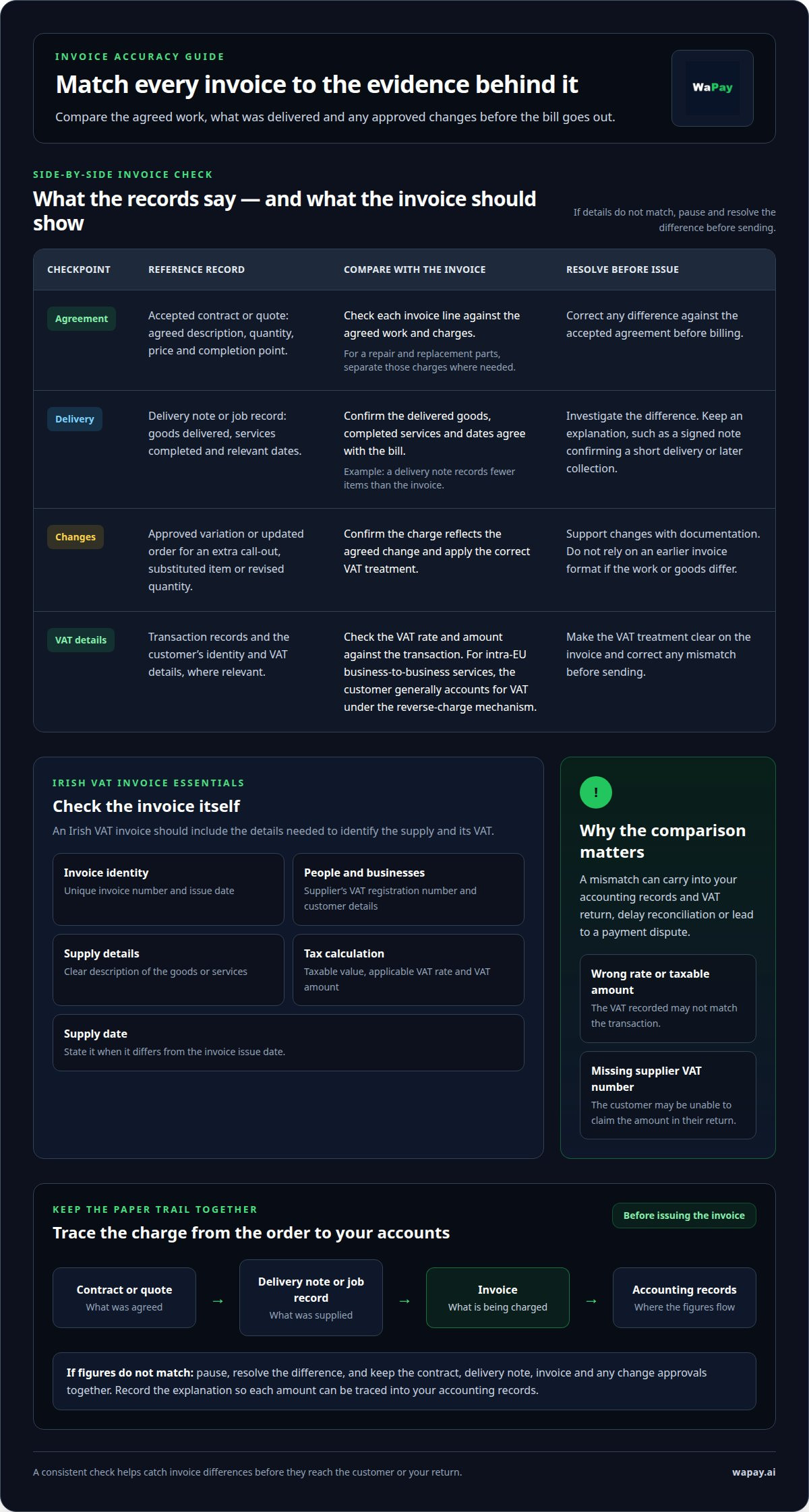
An Irish VAT invoice should show a unique invoice number, issue date, supplier’s VAT registration number, customer details and a clear description of the goods and services. Include the taxable value, applicable vat rate and VAT amount; state the supply date if it differs from the issue date. A consistent invoice creation workflow can help keep these details together.
Issue an invoice for the supply and clearly record the relevant dates. For EU business customers, include the customer’s identity and VAT details. For intra-EU business-to-business services, the customer generally accounts for VAT under the reverse-charge mechanism. Make the VAT treatment clear on the invoice.
Businesses supplying goods in Ireland must register for VAT when their annual turnover exceeds €85,000. For a submitted return, identify the mistake and its net VAT effect, then use the correction route that applies under Irish rules. Correct it promptly rather than waiting for Revenue to raise it. If the invoice is wrong, send the customer a corrected invoice or appropriate correction document, explain what changed, and keep a copy with the original.
There is no single retention period here for every Irish VAT record. Keep invoices, receipts, credit notes and supporting documents organised and accessible so you can substantiate claims and reconcile return figures. Retain the records needed to support each transaction and correction.
2. Consequences of invoice errors for VAT returns and accounting
An invoice mistake can carry straight into the VAT return. If the vat rate or taxable amount is wrong, the VAT recorded may not match the transaction. A missing supplier VAT number can also prevent the customer claiming the amount in their return. A 0% entry applied incorrectly can leave sales and VAT figures inaccurate.
Look for errors by comparing invoices with sales records and the VAT account. Check the invoice sequence as well: a lower-numbered invoice dated after higher-numbered invoices may point to deleted records, especially if the pattern is frequent or significant. Trace any affected amounts into the general ledger and financial statements.
Irish VAT returns are typically filed every two months. Missing a filing deadline can bring penalties and interest, even when the mistake was unintentional. The consequences depend on what went wrong: an incorrect figure affects the return, while a late filing or payment can trigger penalties or interest. Keep the deadline visible in your accounting routine, and correct a submitted return promptly when you discover an error.
Reconcile the VAT account with transactions monthly. Compare return totals with the general ledger and financial statements, and investigate differences before filing. This can reveal issues such as VAT reclaimed on non-deductible expenses or an invoice amount entered twice. Record each correction and keep the supporting invoice, receipt or credit note.
Make invoice records easier to manage with a consistent digital workflow. If repeated invoice admin is slowing you down, set up an invoice workflow and keep the paperwork moving alongside the job.
3. Checking invoice data against contracts and delivery notes
Start with the accepted contract or quote. Compare each invoice line with the agreed description, quantity, price and completion point. If the agreement covers a repair and replacement parts, make sure the invoice separates those charges where needed. This check helps you avoid errors on VAT invoices by catching differences before the customer receives the bill.
Next, compare the invoice with the delivery note or job record. Check that the goods delivered, services completed and dates agree. If a delivery note records fewer items than the invoice, for example, resolve the difference before sending the bill. Keep a record of the explanation, such as a signed note confirming a short delivery or later collection.
Review changes made after the original agreement. An extra call-out, substituted item or revised quantity should be supported by documentation, such as an approved variation or updated order. Confirm the charge reflects the agreed change, then apply the correct VAT treatment. Don’t rely on a previous invoice’s format if the work or goods differ. Checking the updated paperwork helps you avoid errors on VAT invoices when a job changes.
Keep the contract, delivery note, invoice and change approvals together. This paper trail lets you trace each amount from the customer’s order to your accounting records. Before issuing the invoice, compare the customer, descriptions, quantities, charges and VAT details with those documents. If the figures don’t match, pause and resolve the difference first. This makes later reviews quicker and helps explain how you calculated the amount charged.
WaPay: Payments
WaPay helps you manage invoice administration alongside your work. Create invoices and payment links through WhatsApp or the WebApp using a voice note or text message, then send them to customers without returning to a pile of paperwork.
For a sole trader finishing a job, that can mean recording the work and preparing an invoice while the details are fresh. WaPay also supports payment reminders, VAT records and a live business dashboard, helping you see what’s been invoiced and paid. Customer payments go directly to your business bank account.
Use WaPay when preparing invoices and following up on payments takes time away from serving customers. It helps organise routine administration, while you remain responsible for checking invoice details and VAT treatment against each transaction. Visit WaPay to explore how it could fit your workflow.
Make your next invoice easier to manage
Build one straightforward check into your routine: match the invoice to the job records before sending it. That pause helps you avoid errors on VAT invoices and gives you a clearer record if a customer later queries a charge. Keep the process practical, so paperwork doesn’t follow you home after the work is done.
WaPay offers Payments, Invoices and Bills to help organise everyday business administration. Create invoices and payment links from a voice note or text, then manage payment follow-up alongside the job. WaPay supports the admin, while you remain responsible for checking each invoice’s details and VAT treatment.
Take the next step towards a tidier invoicing routine and more time for the work that matters.
Frequently Asked Questions
Why Are VAT Invoice Errors So Costly?
Invoice errors can affect more than the tax figure: unclear or inconsistent details can delay payment while you and your customer clarify what was supplied and what is owed. A customer may query a charge, for example, if the invoice description doesn’t match the agreed job. Resolving the issue creates extra follow-up and takes time away from billable work.
What's the difference between zero-rated and exempt from VAT?
Zero-rated supplies are taxable at a VAT rate of 0%, while exempt supplies are outside the charge of VAT under their exemption. They aren’t interchangeable labels. For example, recording an exempt sale as zero-rated can misstate the type of transaction in your VAT records. Use the treatment that applies to the specific goods or services.
What checks should businesses make before sending a VAT invoice?
Check that the invoice is addressed to the right customer, has a unique number and isn’t duplicated in your records. Recalculate the line totals and invoice total, then confirm the payment details. If you use invoice software, review the final document rather than assuming saved customer or product details are still current.
What are the penalties for errors on VAT invoices in Ireland?
An incorrect figure affects the VAT return. Late filing or payment may also trigger penalties and interest, even if the mistake was unintentional. Correct a submitted return promptly.
What are the rules for VAT credit notes and amended invoices in Ireland?
If an invoice is wrong, send the customer a corrected invoice or suitable correction document, explain what changed and keep a copy with the original.
Frequently asked questions
Why Are VAT Invoice Errors So Costly?
Invoice errors can affect more than the tax figure: unclear or inconsistent details can delay payment while you and your customer clarify what was supplied and what is owed. A customer may query a charge, for example, if the invoice description doesn’t match the agreed job. Resolving the issue creates extra follow-up and takes time away from billable work.
What's the difference between zero-rated and exempt from VAT?
Zero-rated supplies are taxable at a VAT rate of 0%, while exempt supplies are outside the charge of VAT under their exemption. They aren’t interchangeable labels. For example, recording an exempt sale as zero-rated can misstate the type of transaction in your VAT records. Use the treatment that applies to the specific goods or services.
What checks should businesses make before sending a VAT invoice?
Check that the invoice is addressed to the right customer, has a unique number and isn’t duplicated in your records. Recalculate the line totals and invoice total, then confirm the payment details. If you use invoice software, review the final document rather than assuming saved customer or product details are still current.
What are the penalties for errors on VAT invoices in Ireland?
An incorrect figure affects the VAT return. Late filing or payment may also trigger penalties and interest, even if the mistake was unintentional. Correct a submitted return promptly.
What are the rules for VAT credit notes and amended invoices in Ireland?
If an invoice is wrong, send the customer a corrected invoice or suitable correction document, explain what changed and keep a copy with the original.